Legal knowledge management system: definition
A legal knowledge management system is software that captures, organizes, and retrieves a law firm’s know-how, including precedents, briefs, clause banks, and research, so the right information is easy to find and reuse.
If you are working out how to choose a legal knowledge management system, this buyer guide gives you a practical, vendor-neutral way to assess your options.
Introduction
Choosing the right legal knowledge management (KM) system is a strategic decision that impacts your firm’s efficiency, client service, and ability to draw on its expertise. This guide is designed for knowledge lawyers, professional support lawyers (PSLs), law librarians, legal operations teams, in-house legal departments, and law firms of all sizes. It provides a practical, vendor-neutral framework for evaluating legal KM systems, ensuring you select a solution that matches your firm’s needs and supports long-term knowledge reuse.
What this guide covers:
- The 12 most important criteria for selecting a legal KM system
- How to scope your requirements before reviewing vendors
- A side-by-side comparison of KM, document management, and library systems
- A step-by-step evaluation and shortlisting process
- Frequently asked questions about legal KM systems

Why it matters: Selecting the right KM system ensures your firm can capture, organize, and reuse its expertise, improving service consistency, reducing duplicated efforts, and protecting institutional knowledge during staff turnover. Firms with organized knowledge respond faster to clients, enhance efficiency in document drafting and research, and convert tacit knowledge into explicit, reusable assets.
Why knowledge management matters for law firms
Effective knowledge management in legal contexts supports enhancing efficiency in document drafting and research, and helps convert tacit knowledge into explicit knowledge that can be shared and reused.
This guide provides a practical, vendor-neutral framework built around the 12 criteria that matter most when comparing legal KM systems, including search, taxonomy, metadata standards, security, integration, deployment, configurability, user adoption, governance, reporting, and vendor support. It also clarifies how legal KM systems differ from related tools and outlines a practical evaluation process, so you can make an informed decision and choose a system that reduces duplicated work, improves efficiency, and supports more consistent service and faster client response.
If you’re still getting familiar with the fundamentals, start with our guide to what legal knowledge management is.
What should you decide before choosing a legal KM system?
The best evaluations start with your firm’s needs, not a vendor’s product brochure. With knowledge management, the important work begins before any vendor review.
Scoping your current environment
Before reviewing any platform, spend time mapping your current environment:
- Where knowledge currently lives: Identify all locations, including shared drives, email inboxes, document management systems, individual expertise, and matter databases.
- Which knowledge assets matter most: Focus on precedents, clause libraries, research collections, and know-how repositories.
- Who needs access: Consider everyone from fee earners and PSLs to librarians, legal operations teams, and management.
- Which systems the platform must interact with: List platforms like SharePoint, iManage, and other legal technologies.
This scoping exercise pays for itself quickly. McKinsey research has found that knowledge workers spend on average around 1.8 hours a day searching for and gathering information. You can learn more about KM ROI, including a KM ROI calculator that takes the McKinsey research into consideration, in our KM ROI article. In a law firm, that lost time is billable. Once you understand your own requirements, you can evaluate vendors against a consistent framework.
What are the 12 criteria for choosing a legal knowledge management system?
Work through these criteria in order, and score each vendor as you go. Every criterion below is vendor-neutral; how any one supplier measures up comes later.
The 12 Criteria (Numbered List)
- Search that fits how legal teams actually work
- Controlled vocabulary and taxonomy built for law
- Support for recognized metadata and cataloguing standards
- The range of knowledge it can actually hold
- Security and access control that matches your firm’s model
- Integration with the systems you already run
- Deployment that fits your IT and risk posture
- Configurability without heavy custom development
- Findability and adoption for everyday users
- Governance, retention, and the records overlap
- Reporting and usage insight
- Vendor fit: support, migration, and track record
1. Search that fits how legal teams actually work
Lawyers need search that supports both targeted retrieval and broader exploration of the firm’s knowledge assets. Users may search for a specific clause one moment and browse related know-how the next, so lawyers need support for both targeted retrieval and broader exploration across the firm’s knowledge base. Look for powerful search across the knowledge repository, together with the ability to create dedicated portals for different practice groups, business units, or clients. The best systems make it easy to surface relevant knowledge without forcing users to navigate complex structures. Enterprise search also helps users find relevant information across connected sources without having to navigate each repository separately.
Question to ask any vendor: How does search work across our different content types, and can we create separate portals for different practice areas or clients?
2. Controlled vocabulary and taxonomy built for law
A strong legal taxonomy is what makes knowledge discoverable months or years later. A taxonomy is simply an agreed way of tagging and organizing terms. Consistent terminology across practice areas is what makes a document findable eighteen months after it was filed and helps lawyers share knowledge across teams. Look for a genuine controlled vocabulary, ideally a layered (poly-hierarchical) one, rather than free-text tags that drift over time. A sound taxonomy also supports expertise directories by making internal experience easier to classify and find.
Question to ask any vendor: Can we use our own legal taxonomy, and how are terms kept consistent across practice groups?
3. Support for recognized metadata and cataloguing standards
Standards help protect your investment and reduce vendor lock-in. Metadata standards make information easier to manage, migrate, and integrate with other systems. Support for established cataloguing practices and legal industry frameworks such as SALI can improve consistency and interoperability. Here is a list of legal Taxonomies for your reference.
Question to ask any vendor: Which metadata standards do you support, and how easily can we export our data to other systems?
4. The range of knowledge it can actually hold
A legal KM platform should support more than documents alone. Many firms need a system that supports more than legal documents alone, including a mixture of precedents and brief banks, clause libraries, know-how collections, research materials, subscriptions, and physical resources. The broader the knowledge ecosystem the system can support, including a precedent library as a curated current collection rather than a general archive, the fewer disconnected tools you’ll need. Strong systems can also organize model documents and approved fallback positions for repeat drafting work.
Question to ask any vendor: Can a single system hold our precedents, research, and physical library, or would we need several tools?
5. Security and access control that matches your firm’s model
Security requirements should align with your firm’s governance model. Look for granular, role-based permissions that let you control exactly who sees what, whether by role, team, practice area, or portal, in ways that align with your firm’s governance model and protect client confidentiality, along with secure hosting. Be precise about your own requirements first: some firms need matter-level or ethical-wall separation, or detailed audit reporting, so confirm exactly how each vendor handles the model you need, including data security as part of the evaluation.
Question to ask any vendor: How is access controlled, is it role-based, and how are changes and views audited?
6. Integration with the systems you already run
A new knowledge system should work alongside the platforms your teams already use. Most firms already have important content stored in document management systems and collaboration platforms. Integrations may also need to cover case management, billing, and e-signature software so legal documents can be signed electronically from any location. When evaluating vendors, understand exactly how content is connected and surfaced to users. “Integration” can mean many things, from simple links to external documents through to much deeper interoperability, so it is important to understand the practical day-to-day experience and assess how information is transferred to avoid data loss before moving to a new system.
Question to ask any vendor: Exactly how do you connect to our document management systems and other knowledge sources, and what does that experience look like for users?
7. Deployment that fits your IT and risk posture
The right deployment model depends on your operational and regulatory requirements. Some firms prefer cloud-based SaaS delivery because it reduces infrastructure management. Others require on-premise deployment for governance, risk, or data residency reasons. The key is having options that align with your environment.
Question to ask any vendor: Do you offer both cloud and on-premise, and where would our data be stored?
8. Configurability without heavy custom development
Your system should adapt to your firm, not the other way around. Your firm is not a template. Look for a system your own team can shape, with configurable fields, workflows, and branded portals among the key features, so that every change does not become a paid development project. Being able to flag or schedule content for review as the collection evolves is also useful.
Question to ask any vendor: How much can we configure ourselves, and what needs vendor development?
9. Findability and adoption for everyday users
Even the most powerful platform fails if nobody uses it. Even the most powerful platform fails without strong user adoption, so search should be intuitive, portals should be easy to navigate, and training requirements should be reasonable. Features such as alerts and personalized content delivery can also improve engagement and adoption. Intuitive design also helps each team member see what matters to them and reduces non billable tasks spent hunting for knowledge.
Question to ask any vendor: What does the everyday user experience look like, and how much training is typically needed?
10. Governance, retention, and the records overlap
Knowledge management sits close to records management and compliance responsibilities. Consider how information is governed throughout its lifecycle, including retention requirements, records policies, and the legal practice’s compliance responsibilities. Some firms may want these capabilities within the platform, while others manage them through connected systems and established processes. Confirm which approach each vendor supports.
Question to ask any vendor: How does the system support versioning, retention, and our records obligations?
11. Reporting and usage insight
You need visibility into how knowledge is being used. You can only improve what you can see. Look for reporting on what people search for, where they hit dead ends, and how the collection is actually used, so firms can make informed decisions about content priorities and the system keeps getting sharper long after go-live. After all, these insights help knowledge teams continually improve content quality and discoverability. Search and usage reporting becomes even more valuable as AI adoption grows because it reveals gaps in the knowledge base. In 2026, firms are investigating how knowledge management will support responsible AI adoption.
Question to ask any vendor: What reporting do we get on search activity and content gaps?
12. Vendor fit: support, migration, and track record
Choosing software also means choosing a long-term partner. Look for a partner that can support a successful knowledge management program over the long term, with genuine implementation support, practical help migrating content out of legacy systems, a credible roadmap, and a track record of standing behind clients. Migration support should also help preserve valuable information during transition. A core deployment team should guide implementation, training, and early governance decisions. The ABA’s Legal Technology TechReport found attorneys value time savings and efficiency most from new technology, and those benefits only arrive when the rollout is supported properly.
Question to ask any vendor: Who supports us during and after rollout, and how will you migrate our existing content?
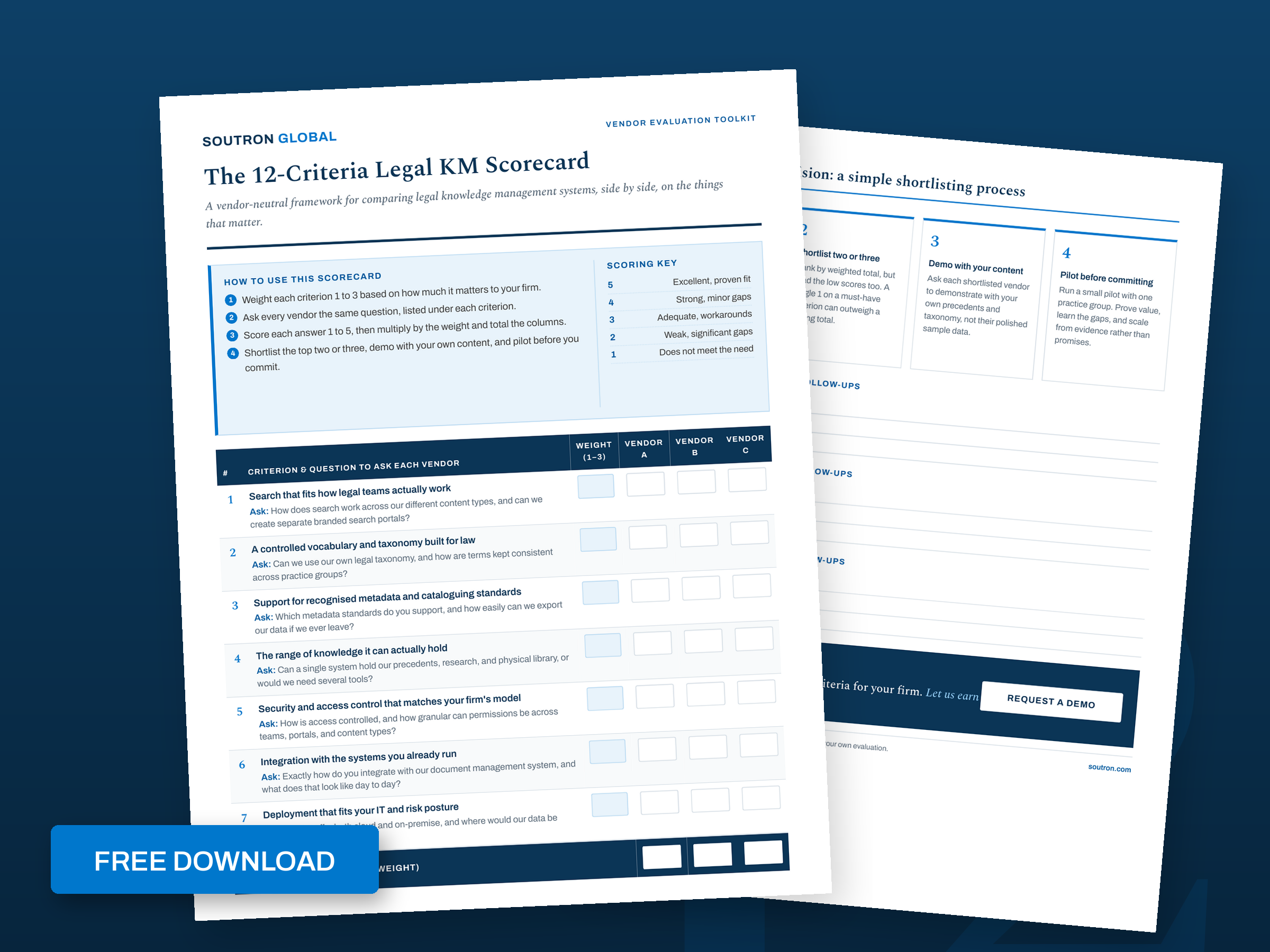
Want to score vendors as you go? Download the 12-Criteria Legal KM Scorecard.
What is the difference between a KM system, a DMS, and a library system?
These terms are often used interchangeably, but they solve different problems.
- Legal knowledge management software captures and organizes a firm’s expertise, making it reusable and discoverable across the organization.
- Legal document management software helps firms organize and retrieve documents, providing version control and secure storage for working documents.
Many firms operate more than one of these systems. In practice, the greatest value comes from how well they work together and how effectively users can move between them. Some platforms, including Soutron, bring library, archive, and knowledge management capabilities together, helping organizations manage internal and external knowledge through a unified approach.
| Dimension | Knowledge management system | Document management system (DMS) | Library / catalogue system |
|---|---|---|---|
| Primary job | Capture and reuse the firm’s know-how | Store, control, and provide version control for the documents of active matters | Catalogue and lend information resources |
| Typical content | Precedents, briefs, clause banks, know-how, research | Live matter files, drafts, email | Books, journals, subscriptions, external resources |
| How you find things | Search plus taxonomy across the whole collection and portals | Matter or folder structure plus full-text search | Catalogue search and classification |
| Access model | Role-based permissions | Often matter-centric | Role or borrower based |
| Best for | Turning individual expertise into a firm-wide, reusable asset | Managing the documents of active matters | Managing and lending external information resources |
How Soutron approaches these criteria
Soutron takes a knowledge-centric approach that focuses on helping legal professionals support internal processes and deliver legal services more efficiently.
A key strength is the ability to create dedicated portals for individual practice groups, departments, or external clients. These portals provide tailored views into a single central database where the collection resides, allowing different audiences to access relevant precedents and other relevant information through a familiar and focused interface. Role-based, granular permissions control who can view and access specific resources.
Soutron also supports sophisticated knowledge organization through its poly-hierarchical thesaurus and controlled vocabulary capabilities, helping firms build consistent legal taxonomy structures that improve findability over time. The platform supports recognized metadata and cataloguing standards and can manage a wide range of knowledge resources, including precedents, research materials, subscription content, library collections, and other knowledge assets.
Content stored in systems such as SharePoint and iManage can be referenced and surfaced through Soutron, helping users discover relevant resources without requiring all content to be migrated into a single platform.
Organizations can choose between cloud (SaaS) and on-premise deployment depending on their operational and governance requirements. Behind it all is 50+ years of experience bringing library, archive, and knowledge management together, which can bring many benefits for firm operations and client service and matters most on criterion 12: the partner you will still be working with a decade from now.
If you would like to see how that maps to your own firm’s content and teams, explore our legal knowledge management solution or Request a Demo.
Let us earn your trust

How to run the evaluation: a simple shortlisting process
A structured process is a strategic priority when the goal is selecting a system that will shape long-term knowledge use. It typically leads to a better decision than relying on demonstrations alone.
Weight your priorities
Start by weighting the 12 criteria based on your firm’s priorities. Security, taxonomy, and integrations may matter more than reporting for one organization, while another may prioritize deployment flexibility and adoption.
Score and shortlist
Next, score each vendor against the criteria and narrow your list to two or three serious contenders. Ask vendors to demonstrate their solution using examples from your own knowledge collections and workflows.
Pilot and involve stakeholders
Before making a final commitment, run a focused pilot with a representative user group. Involve senior partners and senior lawyers in the final evaluation so that their requirements, practical expertise, and governance needs are reflected.
Use the scorecard below to compare options consistently:
| # | Criterion | Question to ask each vendor |
|---|---|---|
| 1 | Search that fits how legal teams actually work | How does search work across our different content types, and can we create separate branded search portals? |
| 2 | A controlled vocabulary and taxonomy built for law | Can we use our own legal taxonomy, and how are terms kept consistent across practice groups? |
| 3 | Support for recognized metadata and cataloguing standards | Which metadata standards do you support, and how easily can we export our data if we ever leave? |
| 4 | The range of knowledge it can actually hold | Can a single system hold our precedents, research, and physical library, or would we need several tools? |
| 5 | Security and access control that matches your firm’s model | How is access controlled, is it role-based, and how are changes and views audited? |
| 6 | Integration with the systems you already run | Exactly how do you integrate with our document management system, and what does that look like day to day? |
| 7 | Deployment that fits your IT and risk posture | Do you offer both cloud and on-premise, and where would our data be stored? |
| 8 | Configurability without heavy custom development | How much can we configure ourselves, and what needs vendor development? |
| 9 | Findability and adoption for everyday users | What does the everyday user experience look like, and how much training is typically needed? |
| 10 | Governance, retention, and the records overlap | How does the system support retention and our records obligations? |
| 11 | Reporting and usage insight | What reporting do we get on search activity and content gaps? |
| 12 | Vendor fit: support, migration, and track record | Who supports us during and after rollout, and how will you migrate our existing content? |
The downloadable version adds blank columns so you can score each vendor as you meet them. Download the 12-Criteria Legal KM Scorecard.
Frequently asked questions
What is a legal knowledge management system?
A legal knowledge management system is software that captures, organizes, and retrieves a firm’s know-how, such as precedents, briefs, clause banks, and research, so the right information is easy to find and reuse. The best fit depends on how your teams search, how your content is classified, and how your firm controls access. It should also help legal professionals find relevant information quickly so client service stays consistent.
What is the difference between a KM system and a document management system?
A document management system stores and versions the working documents of active matters, usually organized by matter or folder. Legal document management software helps firms organize and retrieve documents, providing secure storage and version control. A knowledge management system focuses on capturing and reusing firm-wide know-how, using search and a taxonomy so expertise is findable across practice areas. Many firms run both, and the value comes from how well they connect.
How is a KM system different from a law library or catalogue system?
A library or catalogue system manages and lends information resources such as books, journals, and subscriptions. A knowledge management system organizes the firm’s own work product and expertise. Some solutions, including Soutron, bring library, archive, and knowledge management together so internal know-how and external resources are searchable in one place.
What features should a legal knowledge management system have?
Buyers should compare key features such as search, taxonomy, security, integration, and deployment, alongside support for recognized metadata standards, granular role-based access permissions, and portals that make knowledge easy to find without heavy training. AI tools and artificial intelligence are only useful when grounded in a well-organized knowledge base. Our legal knowledge management software guide covers the feature set in more depth.
Should a legal KM system be cloud-based or on-premise?
Both models are common. Cloud (SaaS) reduces the load on internal IT and speeds up updates, while on-premise gives you direct control over where data sits. The right choice depends on your firm’s IT capacity, security policy, and data-residency requirements. Ask each vendor which options they support.
How much does legal knowledge management software cost?
Pricing usually depends on the number of users, the modules you need, the deployment model, and the level of implementation support. Most vendors scope pricing to your requirements rather than list a single price. When comparing quotes, check what is included, such as migration, training, and support, so you compare like for like. If KM or practice tools connect with billing systems, firms can bill clients more accurately, and legal billing software can reduce payment times.
How long does it take to implement a legal KM system?
Timelines depend on how much content you migrate, how many integrations you need, and how ready your taxonomy is. Firms often implement in phases to improve user adoption and reduce disruption to internal processes. A focused rollout with one practice group can go live quickly, while a firm-wide programme takes longer. Ask vendors for a realistic plan, and start with a pilot to prove value before scaling.
Do small and mid-size firms need a legal knowledge management system?
Yes. Smaller firms often feel the loss of institutional knowledge most sharply when a key person leaves. When partners retire, a KM system helps preserve institutional knowledge that might otherwise walk out the door. A right-sized system helps capture precedents and know-how, shortens onboarding, and reduces repeated work, and small firms may not need the same level of complexity as larger organizations. This also supports a steadier client experience and stronger client satisfaction because work can stay consistent during turnover. Knowledge management for legal professionals is not a big-firm luxury; it is how expertise survives turnover.
The framework is the decision
Choosing the right legal knowledge management system is not about finding the longest feature list. It is about finding a platform that matches how your people search, organize, secure, and reuse knowledge every day.
A clear framework makes how to choose a legal knowledge management system much simpler. Evaluate vendors against the 12 criteria, score them consistently, and test them with real content before making a decision.
The right platform should also support your firm’s broader knowledge management strategy for long-term legal operations.
If you’d like tailored guidance, Request a Demo.
Or download the 12-Criteria Legal KM Scorecard and compare vendors with confidence.