Most law firms already own the knowledge that makes them valuable. It sits in closed matters, in the precedents a partner keeps in a personal folder, and in the memory of the associate who handled a similar deal last year. The problem is finding it again. When knowledge is hard to locate, lawyers rebuild work the firm has already done, and hard-won know-how leaves quietly when people move on.
Law firm knowledge management software exists to close that gap. This guide explains what the software does, the features that matter, how it fits alongside the systems you already run, and how to choose a solution that suits your firm. For the wider discipline behind it, see our guide to legal knowledge management.
| Law firm knowledge management software is a system that captures, organizes, and retrieves a firm’s own work product and expertise, including precedents, clause libraries, matter know-how, and records of who has handled what, so lawyers can find and reuse trusted knowledge quickly. It works alongside a document management system and adds curation, legal taxonomy, and firm-wide search. |
What does law firm knowledge management software actually do?
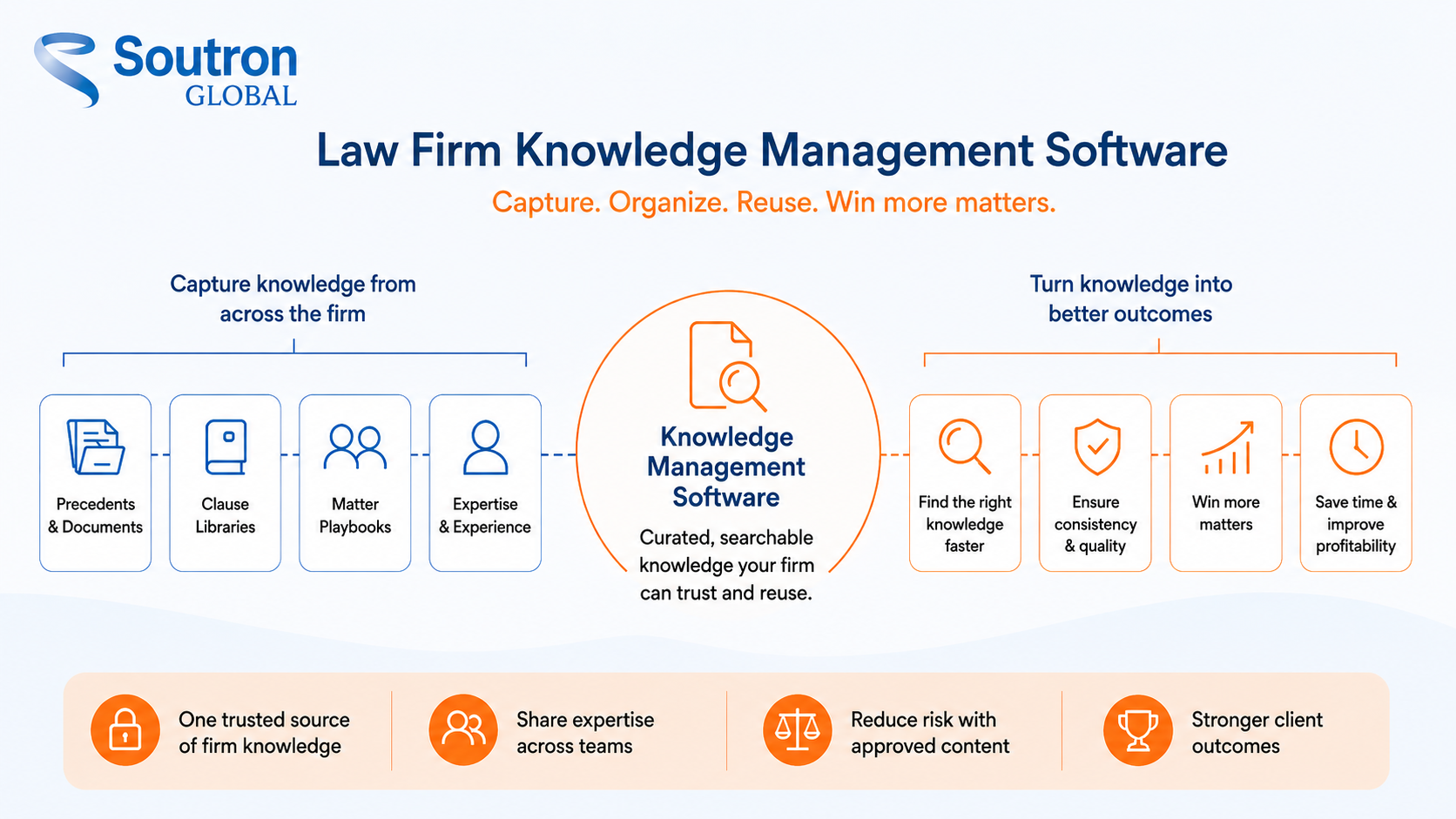
The job of the software is to turn knowledge that lives in individuals into a resource the whole firm can use. It gathers the material a firm generates as a by-product of doing the work, the vetted past documents, the language that has already been approved, the record of how a type of engagement is run, and the knowledge of who has handled what, and holds it in one place where it can be classified, governed, and found. Our guide to building a searchable brief bank covers one of those collections in depth.
The word that matters most here is curation. A repository that holds everything the firm has ever filed is not automatically a knowledge base. Knowledge management software supports a curation layer in which teams identify the work worth reusing, classify it against a controlled vocabulary, and make it easier to retrieve when a lawyer needs it. A document store preserves material. Knowledge management adds the curation and classification that make the right material easy to find and reuse.
For firms under growing pressure on pricing and client value, knowledge reuse becomes a business priority rather than only an information-management initiative. In Thomson Reuters’ 2026 Future of Professionals report, 71 percent of in-house legal professionals said they expect their outside firms to change how they charge as AI use increases. Fixed and capped fees leave little room to bill for work the firm has effectively done before, and lateral mobility means know-how can leave with the people who hold it.
How does law firm KM software fit alongside a DMS, practice management, and other legal tech?
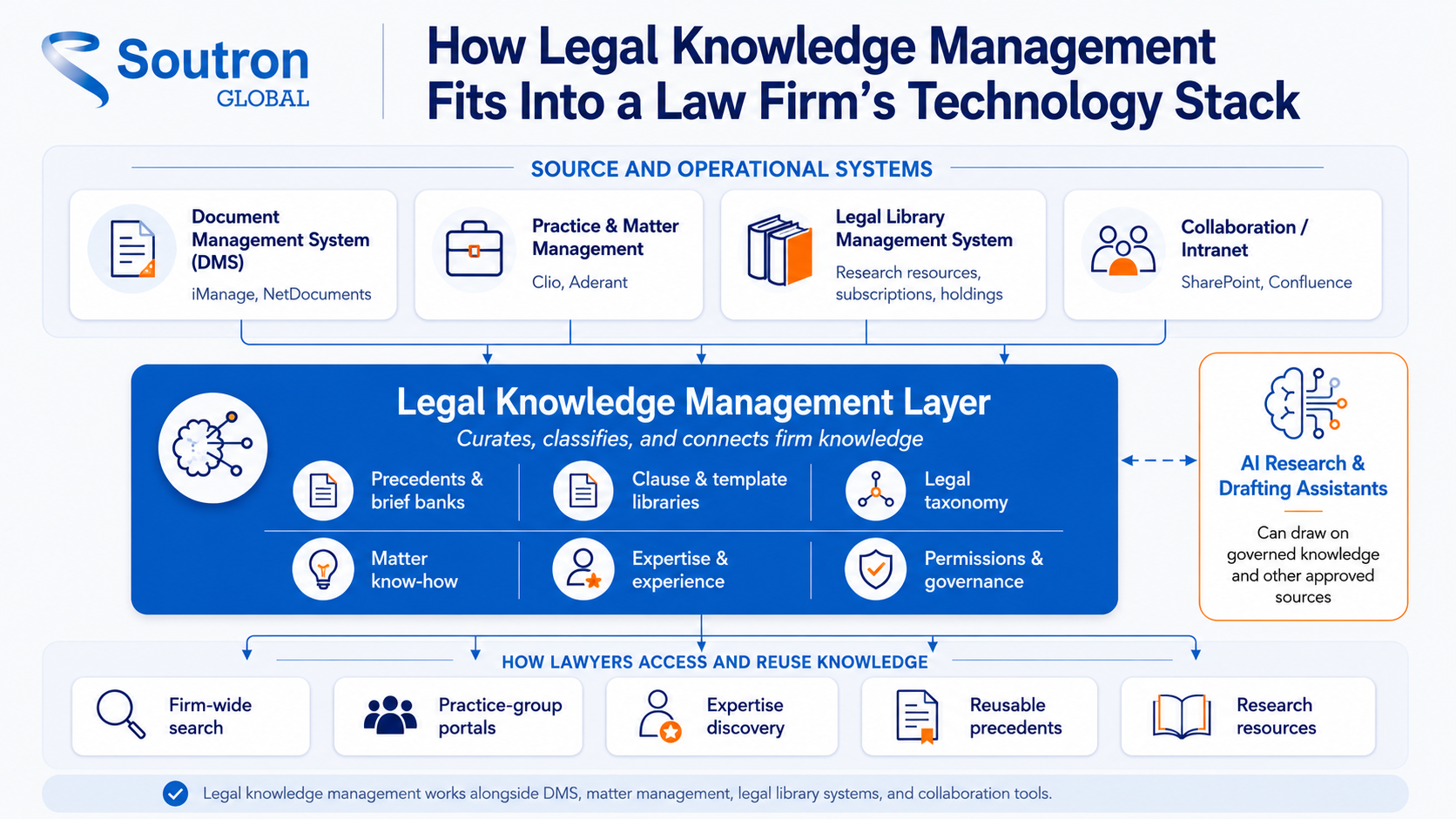
Knowledge management software is often confused with systems a firm already owns. The table below shows what each one is for, and where knowledge management adds something the others do not.
| Software type | Its main job | Examples | Relationship to knowledge management |
|---|---|---|---|
|
Knowledge management software |
Curate and surface the firm’s own work product and expertise for reuse | (the category this guide covers) | The curated knowledge layer |
| Document management system (DMS) | Store, version, and secure working files and email | iManage, NetDocuments |
The source of documents; KM curates the best of them |
|
Practice or matter management |
Run matters, deadlines, time, and billing | Clio, Aderant | Primarily operational; matter data can also feed KM and expertise systems |
| Legal library management system | Manage research resources, subscriptions, holdings, and access to external databases | (specialist library and ILS systems) |
Complements KM by managing the authoritative resources lawyers rely on |
|
Generic knowledge base, wiki, or intranet |
General collaboration and internal pages | SharePoint, Confluence |
Can hold content, but legal taxonomy and precedent curation are left to the firm to build |
|
AI research and drafting assistants |
Help draft documents and research the law | Harvey, CoCounsel |
Use knowledge; KM organizes what they draw on |
Each of these systems does its job well. None of them is designed to curate a firm’s know-how for reuse. That is the gap knowledge management software fills: it works alongside what you already run, identifies the material worth reusing, classifies it against a legal taxonomy, and makes it retrievable across matters and practice groups. A firm does not replace its existing systems to do this. It adds the layer that turns stored documents into knowledge lawyers can find and apply again.
The features that matter in law firm knowledge management software
A knowledge management system is judged on what it lets your firm build and how easily lawyers retrieve the result. The features below are the ones worth testing in a demonstration, each with a plain question you can put to any vendor.
|
Feature |
What it does | Why it matters for a firm | Question to ask a vendor |
|---|---|---|---|
| Legal taxonomy and controlled vocabulary | A structured classification for legal content | Improves consistency and precision in retrieval |
Can we use our own legal taxonomy, and how does it handle multi-category relationships? |
|
Full-text and fielded search |
Search across content and metadata | Reduces the time needed to retrieve relevant material | Can I search on my own content during a trial? |
| Practice-group and office portals | Tailored access with saved searches and alerts | Each team sees what is relevant to it |
Can portals be configured per practice group? |
|
Configurable record types and cataloging |
Describe precedents, know-how, and resources in the fields your firm uses | The system fits your material instead of forcing a rewrite | Can we configure our own fields and record types? |
| Role-based access and permissions | Permissions by user role, with an audit trail | Protects sensitive materials and client confidentiality |
Can permissions reflect our roles, and does it respect the barriers our conflicts system and DMS already enforce? |
|
Integration |
Connects to the firm’s DMS and collaboration tools | Fits the existing stack instead of replacing it | Do you connect with iManage and SharePoint? |
| Deployment, migration, and support | Cloud or on-premise, with a managed migration | Reduces the internal burden of migration and rollout |
Do you run the data migration for us? |
Capture and curation
Those features exist to support what the firm actually builds. Knowledge assets are not switched on out of the box; they are created and maintained by the people who own the knowledge, using the system to hold and structure them. With the right foundation in place, a firm can build:
- A precedent and brief bank: a curated, searchable store of vetted past work, so lawyers start from proven material rather than a blank page.
- Clause and template libraries: pre-approved language and model documents that support consistent drafting.
- Matter playbooks: a record of how the firm runs a given type of engagement.
- An expertise and experience directory: a searchable view of who has handled what, so the right person is easy to find.
A knowledge base is only as good as the material in it. Look for a system that makes it straightforward to nominate a document as a precedent, review it, and prepare it for reuse. Preparing a precedent may include generalizing it, removing client-specific information, and de-identifying material where appropriate, so the reusable version reflects the firm’s approach rather than one engagement.
Classification and findability
A legal taxonomy or controlled vocabulary brings consistency to classification and can improve retrieval precision, helping lawyers narrow results to more relevant clauses, briefs, and other knowledge assets. For concepts that need to sit under more than one category, a configurable poly-hierarchical thesaurus adds flexibility. Full-text and fielded search, saved searches, and alerts let lawyers find material by content and by metadata.
Access, discovery, and expertise
Practice-group and office portals give each team a view tailored to its work. Firm-wide search across the collections and sources you connect means a lawyer looks in one place rather than several. Expertise directories and matter or deal databases answer a question lawyers ask constantly, which is who has handled something like this before, and turn that tacit knowledge into something searchable.
Security, governance, and integration
Access should be controlled by configured roles and permissions, so sensitive materials stay with the people entitled to see them. Where a firm operates ethical walls or other information barriers, a knowledge management system should honor the firm’s existing matter-level restrictions and access controls rather than create a separate, inconsistent permission model. If the system is hosted, ask about the hosting security standard. Soutron’s hosting platforms are ISO 27001 certified. Integration keeps the software from becoming another silo. Soutron connects with iManage, SharePoint, Legal Search Connect, and EBSCO, so knowledge is easier to retrieve without moving everything into a new home.
A realistic word on AI
Much of the category is now sold on artificial intelligence, and the honest position is narrower than the marketing. For internal knowledge use cases, AI is more useful when it can work from trusted, well-organized firm content and respect the same access controls that govern the underlying material. It does not replace legal research or a lawyer’s judgment. Strong knowledge management gives AI a more reliable foundation; it does not remove the need for source validation or lawyer review.
If you are weighing AI features inside a knowledge management system, a few questions separate substance from marketing. Ask which sources the AI is allowed to use and how those approved source sets are governed, whether access permissions carry through to what the AI can retrieve, whether users can see the source behind each answer, whether a person stays in the loop for anything that will be reused, and whether it clearly separates trusted knowledge from unverified material. The answers tell you more than any feature label.
Capturing know-how is only half the job. Whether fee earners actually find it depends on the search layer, including which facets are exposed and how results are ordered. Our white paper on search portal design covers those decisions.
When a general tool is no longer enough
Many firms begin with the tools they already have, a shared drive, an intranet, or a general wiki such as SharePoint or Confluence, and for a time that works. The limits show as the collection grows. General platforms arrive without a legal taxonomy, a precedent-governance model, or the workflows that keep know-how current, so the firm has to design, configure, and maintain all of it. Without clear ownership and review rules, the result is a site full of material whose status no one can judge, which is the point at which lawyers stop trusting it and go back to asking a colleague.
A purpose-built legal knowledge management system starts from the opposite position. Classification, curation, permissions, and retrieval are built in and configured around how your firm works, so the information team spends its time curating knowledge rather than maintaining the platform that holds it.
Five checks before you shortlist law firm KM software
A useful evaluation starts with understanding what knowledge the firm already has, where it lives, who owns it, and what lawyers struggle to retrieve today. That is more productive than opening with a long feature comparison. A short, practical sequence helps:
- Start from your real problems: Name the two or three things lawyers cannot find today, and judge every option against those.
- Involve the people who own knowledge: Knowledge lawyers, professional support lawyers, and law librarians know what should be captured and how it should be classified.
- Check the fit with your stack: Confirm the system connects with your document management system and the tools your lawyers already use.
- Test search on your own content: A demo on sample data tells you far more than a feature list. Ask to search material that looks like yours.
- Plan for adoption and migration: Ask who runs the data migration, how the taxonomy is built, and how the vendor supports the firm after go-live.
This is a summary rather than a full evaluation. For a structured way to score vendors against weighted criteria, work through our guide on how to choose a legal KM system.
If your firm is now comparing platforms, the most useful next test is to see how a system handles your own taxonomy, your knowledge sources, and the tools your lawyers already use.
| See how Soutron fits your firm’s requirements. Soutron Global is a configurable legal knowledge management solution built on more than 50 years of information-management heritage, designed around your firm’s own taxonomy and the systems your lawyers already use. Request a demo to see a knowledge hub configured around a legal taxonomy, or explore our legal library and knowledge solution for law firms. |
Stinson LLP, a US firm with around 1,000 attorneys across 12 offices, uses Soutron as a single Collections and Connections knowledge portal that links lawyers to curated resources, practice-group pages, and external databases such as Westlaw and LexisNexis from one place. Their case study shows how a legal library can become a firm-wide portal for curated research resources.
Frequently asked questions
Who owns knowledge management in a law firm?
In larger firms, ownership often sits with a head of knowledge, a knowledge lawyer, or a similar role, supported by professional support lawyers, law librarians, legal operations, and technology teams. Smaller firms may share the responsibility more informally. Whatever the structure, the people who understand the firm’s work usually decide what to capture and how to classify it, while technology teams keep the system running.
Is SharePoint enough for a law firm’s knowledge base?
It can work as a document repository, and some firms run knowledge sites on it successfully. What it does not provide out of the box is the legal-specific layer: a legal taxonomy, precedent governance, and the review workflows that tell a lawyer whether a document is current and approved. A firm can build those on a general platform, but it takes design work and ongoing administration. A purpose-built legal knowledge management system starts with them in place and configures them around how your firm works.
What does a professional support lawyer (PSL) do?
A professional support lawyer is a qualified lawyer who supports fee earners rather than billing client work directly. PSLs keep precedents and know-how current, maintain the firm’s model documents, and help teams find and reuse trusted material. In some firms, a comparable role is described as a knowledge lawyer.
Does knowledge management software replace legal research services like Westlaw or Lexis?
No. Legal research services help lawyers find and validate external law, such as statutes and case law, and confirm whether an authority is still good law. Knowledge management software organizes the firm’s own work product and expertise so it can be reused. The two are complementary: one provides access to the law itself, the other manages the knowledge the firm creates.
How long does it take to implement law firm knowledge management software?
It depends on the volume of content, the state of your metadata, and how much taxonomy design is needed before go-live. A phased rollout, starting with one or two practice groups and a defined set of precedents, reduces risk and shows value sooner than a firm-wide launch. Ask any vendor how they run the data migration and how they help build the taxonomy.
Is legal knowledge management software worth it for a mid-size firm?
It can be, because the cost of not finding knowledge is easy to underestimate. Rebuilt work, slow RFP responses, and know-how lost to lateral moves all carry a price. A conservative business case that counts recovered time and avoided duplication can make the value easier to evaluate. Our guide to knowledge management ROI sets out one way to build it.
The takeaway
The firms that get the most from knowledge management treat it as a discipline first and a purchase second. The software matters, but it earns its place by making the firm’s own knowledge findable and reusable, and by fitting alongside the document management, research, and collaboration tools already in daily use. Judge law firm knowledge management software on how well it captures the right work, classifies it against a legal taxonomy, and puts it in front of the lawyer who needs it, on the systems they already work in. Start from the knowledge you already have, involve the people who own it, and choose a solution that helps that knowledge survive every promotion, retirement, and lateral move.