Digital Archiving Introduction
In a world where virtually everything is created, stored, and shared digitally, the ability to preserve and retrieve information over the long term has never been more important. Whether you are a business owner, IT professional, records manager, or simply someone who wants to protect personal files, understanding digital archiving is an essential skill for the modern age.
As organizations and individuals have shifted from paper documents to electronic files and digital files, digital archiving has significantly reduced the need for physical storage space. This evolution brings numerous advantages, including improved accessibility, enhanced efficiency, and lower costs compared to traditional physical storage methods. However, regular maintenance is essential to ensure the ongoing reliability and security of digital archives.
Digital archiving involves structured processes, metadata, integrity controls, and retrieval mechanisms to manage and preserve the growing volume of digital records created by individuals, businesses, and governments. Digital archives can be composed of various media types, including text, images, audio, and video, each requiring specific preservation and accessibility strategies.
This article covers everything you need to know: what digital archiving is, why it matters, the methods and tools available, digital archiving challenges, and the best practices that will help you build a reliable, future-proof archiving strategy.
Data Loss Is More Common Than You Think
According to industry research, approximately 140,000 hard drives fail every week in the United States alone. Ransomware attacks have surged dramatically in recent years, with many businesses losing access to years of data in a matter of hours. Without a proper archiving strategy, recovering from these incidents can be impossible.
Digital archiving and digital preservation are the processes of storing and organizing digital content so it stays accessible, trustworthy, and usable over the short and long term. These processes ensure that digital records remain accessible for future access by implementing structured processes, metadata, and integrity controls.
As businesses, governments, and individuals create more digital content, archiving becomes essential for compliance, continuity, and long-term digital preservation. A strong digital archive ecosystem helps protect documents, emails, media files, and other records from corruption, loss, or format obsolescence.
What Is Digital Archiving vs Digital Preservation?
Digital archiving and digital preservation refer to the processes of preserving and organizing digital records to ensure they remain accessible, trustworthy, and usable not only today, but over time, involving structured processes, metadata, integrity controls, and retrieval mechanisms.
Digital archiving systems manage digital materials—such as documents, contracts, financial records, and customer data—using digital storage and data storage solutions to ensure easy retrieval. In practice, it often involves structured storage, metadata, access controls, and retention rules so archived materials can be found and used on a regular basis.
For many organizations, one of the primary aims of digital archiving is long-term digital preservation, which includes maintaining data integrity through checksums and regular integrity checks to prevent records from being corrupted or altered. Digital preservation also involves identifying and selecting materials with long-term value that need to be archived.

Digital archiving can be categorized into active and passive archiving: active archiving allows for real-time updates and easy access, while passive archiving focuses on long-term digital preservation and cost-effective storage. Soutron offers a scalable digital archive solution for special and corporate archives, in addition to a scalable archive management system for cultural institutions.
Why Is Digital Archiving Important?
The case for digital archiving is compelling across multiple dimensions: legal compliance, business continuity, historical preservation, and risk management. Preserving historical documents and historical records is crucial for legal requirements and ensuring business continuity over time.
It is especially important for records that must be kept for legal, regulatory, historical, or operational reasons. Unlike short-term storage, a digital archive is designed for long-term archival storage and reliable retrieval. Archive documents require systematic storage strategies, including organizing, indexing, and ensuring secure, future access to inactive or non-current records.
Additionally, digital archiving eliminates most of the need for off-site physical storage space and reduces the associated costs of maintaining and managing paper-based records, making it a cost-effective and scalable solution. Digital documents can play a key role in digital archiving because they often require digital data preservation over and above what digital archives alone provide. Some of those reasons include:
Legal and Regulatory Compliance
Businesses across virtually every industry are required to retain certain records for specific periods of time. Key regulations include: GDPR, HIPAA, SOX, and other government agency regulations such as the ones from the SEC. Organizations must meet regulatory requirements and compliance requirements, emphasizing strict adherence to data protection regulations when managing sensitive or confidential information within digital archives.
Compliance archiving helps organizations maintain a strong compliance posture by ensuring business records are stored in a tamper-proof format for a legally defined period, enabling access for audits, e-discovery, and regulatory inquiries.
Preserving Institutional Knowledge
Beyond compliance, digital archives serve as the institutional memory of an organization. When key employees leave, when systems are upgraded, or when business processes change, archived records ensure that critical knowledge and context are not lost. For academic institutions, government agencies, and cultural organizations, this preservation function is even more central to their mission. Users benefit from digital archives through efficient access and retrieval of information, ensuring that valuable data remains available when needed.
In the broader archival world, digital and physical archiving practices coexist and complement each other, requiring organizations to understand and manage both approaches effectively. The creation of finding aids is essential in this context, as they help users locate archived information quickly and efficiently, supporting long-term usability and streamlined retrieval processes.
Supporting Business Continuity
A robust digital archive is a cornerstone of any effective disaster recovery plan. When primary systems fail, archives provide a reliable source of truth from which operations can be restored. This is especially critical for industries where data loss can have life-or-death consequences, such as healthcare, finance, and critical infrastructure.
Digital Archiving vs. Records Management
Records management refers to the systematic control of records throughout their lifecycle — from creation to disposition. Digital archiving is a subset of records management, focusing specifically on the long-term preservation phase. Not every record in a records management system will end up in a digital archive; only those deemed to have lasting value are typically archived.
Digital Archiving vs. Digital Backup
Many people use the terms “archiving” and “backup” interchangeably, but they serve very different purposes. A backup is a short-term safety net — a copy of active data designed to be restored quickly after data loss or system failure. An archive, on the other hand, is a long-term repository for data that is no longer actively used but must be retained for legal, historical, or compliance reasons. Data archiving and electronic archiving both focus on the long-term access and security of digital content, ensuring data security by protecting stored information from unauthorized access, loss, or alteration.
Modern digital archiving software supports diverse data types, including email, chat, voice, video, and files from collaboration platforms, reflecting the varied communication methods organizations use today.

Backups protect against data loss today; archives preserve data for the future.
How Digital Archiving Works
A digital archiving system usually starts by preparing files to be ingested into a central repository, adding metadata, indexing them, and applying access and security controls. Digital archiving systems support document management by systematically organizing and managing digital records, ensuring their preservation, integrity, and easy retrieval for future access. The archive may also use integrity checks to detect corruption and prevent unauthorized changes.
Common digital archive and digital preservation components include:
- A secure data repository for storage, such as a Trusted Digital Repository.
- Archiving software for organizing and managing records.
- Metadata for search and retrieval.
- Access and permission controls for security.
- Integrity verification to protect file authenticity.
Digital archives require ongoing intervention and regular maintenance to ensure files remain accessible as software and hardware evolve.
Types Of Digital Archiving
Different types of content require different archiving approaches and tools, depending on the type of content and the organization’s goals. Archive documents can include both digital materials and digital files, ensuring that a wide range of assets—such as contracts, financial records, and customer data—are archived and accessible in electronic formats.
- Document archiving: Used for contracts, reports, invoices, and records that need long-term retention. This often involves transitioning from physical documents to digital files, improving accessibility, security, and efficiency.
- Database archiving: Structured data in databases — customer records, transaction histories, operational data — must be archived in a way that preserves not just the raw data but the relationships and context that make it meaningful. Soutron’s archive database management system does just that.
- Email archiving: Archives business communications for legal, compliance, and audit purposes.
- Born-digital media archiving: Stores photos, audio, video, and other rich media in preserved formats.
- Web archives: Websites and online content change constantly and can disappear entirely when domains expire or organizations shut down.
Most organizations with large collections may use scan-on-demand methods to manage physical documents before fully transitioning to digital archiving.
Methods Of Digital Archiving
- Cloud archiving: Uses cloud-based systems for scalable storage and access, while still requiring strong retention and security controls.
- On-premises archiving: Keeps archives inside an organization’s own infrastructure for direct control and governance.
- Hybrid digital archiving: A hybrid approach combines on-premise and cloud storage, allowing organizations to keep the most sensitive or frequently accessed data on-site while leveraging the cloud for less sensitive or rarely accessed content.
- Offline Storage: Modern LTO (Linear Tape-Open) tape can store tens of terabytes per cartridge and has a shelf life of 30 years or more when stored properly. Tape is particularly valuable as an “air-gapped” backup — physically disconnected from networks and therefore immune to ransomware and other cyber threats.
Key Features of a Good Digital Archiving System
Not all archiving solutions are created equal. When evaluating a digital archiving system, look for the following essential features:
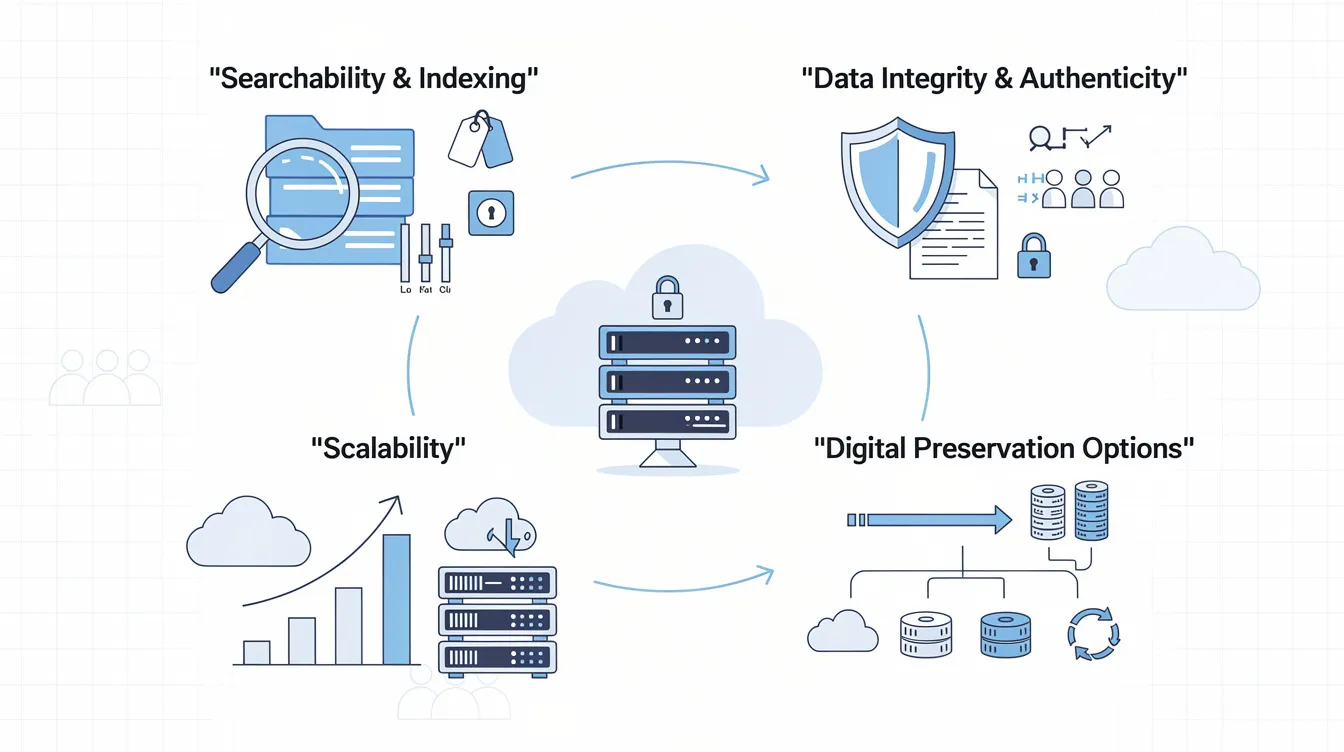
- Searchability and Indexing: The ability to quickly locate specific records through full-text search, metadata filtering, and advanced query capabilities is critical for both day-to-day use and legal discovery. Easy retrieval of stored information ensures that data can be accessed promptly for regulatory compliance, audits, and investigations.
- Data Integrity and Authenticity: Checksums, digital signatures, and hash verification ensure that archived files have not been altered or corrupted over time. This is especially important for records that may be used as legal evidence.
- Scalability: As data volumes grow exponentially, your archiving solution must be able to scale without compromising performance or requiring disruptive migrations. Robust data storage capabilities are essential for securely archiving documents and supporting future information management needs.
- Digital Preservation Options: To prevent format obsolescence, a digital preservation solution with a trusted data repository that provides fixity checks should also be used. Soutron provides a Trusted Digital Repository that provides digital preservation options above and beyond a digital archive.
- Access Controls and Security: Role-based access controls, multi-factor authentication, and encryption at rest and in transit protect archived data from unauthorized access. Strong data security measures are vital to safeguard stored digital content—including texts, images, audio, and videos—from unauthorized access or alterations.

One of the most significant advantages of digital archiving is the ease of accessing and retrieving data, which boosts productivity and enhances decision-making processes.
Digital Archiving Best Practices
The strongest archiving programs follow repeatable best practices:
Defining Scope and Policy
- Define the archive’s scope and purpose: Determine what content needs to be archived, how long it needs to be retained, who is responsible for managing it, and how it will be disposed of when the retention period ends. Your policy should be documented and reviewed regularly.
Metadata Standards
- Use consistent, standards-based metadata: Ensure files can be searched and understood later and enforce it across all archived content. Standards such as ISAD(G), EAD, DACS and others should be reviewed for best fit.
File Format Selection
- Choose the right file formats: Select formats that support long-term readability and migration. Proprietary file formats can become inaccessible when the software that created them is discontinued. For long-term preservation, prioritize open, standardized formats such as PDF/A for documents, TIFF or PNG for images, MP4 (H.264) for video, and CSV or XML for structured data.
Retention and Deletion Rules
- Set retention and deletion rules: Base these on technology, legal, and business needs.
Security and Access Controls
- Protect archives with permissions, encryption, and access controls: For physical storage, consider environmental factors such as humidity, temperature, and pests, which can damage records and increase costs. For digital archives, ensure compliance with data protection regulations to safeguard sensitive information.
Regular Audits and Integrity Checks
- Perform regular audits and integrity checks: Storage media degrades over time, a phenomenon known as “bit rot.” Schedule regular integrity checks to verify that archived files are still intact and uncorrupted to ensure files do not become corrupted or altered. Regular maintenance is essential for both physical and digital archiving systems to prevent vulnerabilities, ensure data integrity, and maintain proper functioning.
Staff Training
- Document policies and train staff: Ensure archiving is repeatable and auditable. Technology is only as effective as the people using it. Ensure that all staff who create or handle records understand the organization’s archiving policies and know how to correctly save, tag, and submit content for archiving.
3-2-1 Rule
- Follow the 3-2-1 rule: Keep at least 3 copies of your data, on at least 2 different types of storage media, with at least 1 copy stored off-site (or in the cloud). This approach protects against hardware failure, physical disasters, and cyber attacks simultaneously.


Common Challenges in Digital Archiving
Traditional physical archiving can be extremely time-consuming, requiring manual sorting, organizing, and maintaining of documents, whereas digital archiving streamlines these processes and increases efficiency. Being aware of these pitfalls can help you avoid or mitigate them.
Format Obsolescence
Format Obsolescence: As discussed above, file formats and the software needed to read them can become obsolete, making archived content inaccessible. Regular maintenance and monitoring are required to ensure files remain accessible over time, making this one of the most serious long-term risks in digital preservation.
Storage Costs
Storage Costs: Data volumes are growing exponentially, and storing everything indefinitely is neither practical nor cost-effective. Physical archives require significant storage space, which can be costly and inefficient. Digital archiving reduces the need for physical storage facilities, minimizing costs and improving security by reducing the physical footprint required for storing documents. Organizations must develop clear retention schedules that balance preservation needs with storage costs.
Data Migration Risks
Data Migration Risks: Moving data from one system or format to another always carries the risk of corruption, loss, or metadata degradation. Migrations should be carefully planned, tested, and verified.
Security Threats
Security Threats: Archives are high-value targets for cybercriminals and malicious insiders. Data breaches and cyberattacks are significant risks, especially when archives contain sensitive or confidential information. Strong access controls, encryption, monitoring, and compliance with regulatory requirements are essential to protect digital archives from unauthorized access and ensure data security.
Organizational Buy-In
Lack of Organizational Buy-In: Archiving is often seen as a low-priority, back-office function until something goes wrong. Oftentimes, upper management thinks data backups are all that is needed.
Digital Archiving Vs Backup
Digital archiving and backup are related, but they are not the same. Backup is mainly about restoring data after accidental deletion, failure, or disaster, while archiving is about preserving information for future use, compliance, and retrieval. Digital archiving ensures that digital files, digital materials, and digital records are archived, organized, and accessible for long-term use.
A simple example: a company’s daily backup may help recover yesterday’s files, but its archive preserves signed contracts from five years ago in a way that is organized and searchable. Digital archiving also provides fast, around-the-clock access to documents from any location.
Why Digital Archiving Matters
Digital archiving helps organizations reduce risk, maintain compliance, and preserve institutional knowledge. It also supports long-term access to materials that may otherwise become difficult to open as software, file formats, and systems change over time. Modern digital storage and data storage solutions play a crucial role in ensuring future access by securely preserving digital assets and enabling easy retrieval as technologies evolve.
Digital archiving is the disciplined process of using standards-based archive solutions in addition to digital preservation information technologies so it remains accessible and reliable over time, often utilizing digital archiving systems that systematically organize and manage electronic data to ensure its preservation, integrity, and easy retrieval. With the right methods, metadata, security, and retention practices, archives become a durable asset rather than just a storage location. Plus, all organizations need to understand that to preserve cultural heritage information and long term document and data accessibility, a digital preservation system should be implemented as well.
Next Steps
Digital archiving solutions available from Soutron Global include:
- Soutron Archive Management for special and corporate archives, scalable to include Soutron’s library software
- MINISIS Archive for Cultural Assets, scalable to the complete Cultural Asset Management
- Trusted Digital Repository (TDR) for digital preservation
Digital archiving offers numerous advantages, such as improved accessibility, enhanced security, lower costs, and greater efficiency compared to traditional physical storage methods. To see if our solutions can be of benefit to you, reach out for a product demonstration.
FAQ
Is digital archiving the same as cloud storage?
No. Cloud storage can be part of an archive, but archiving also includes retention policies, organization, integrity protection, and long-term access planning. Historically, archiving dates back to ancient civilizations using clay tablets to record and preserve important information, showing that the practice of safeguarding records predates digital methods.
What files should be archived?
Files with legal, historical, operational, or business value are the best candidates, including documents, emails, photos, audio, and video. Unlike physical documents, which require secure storage space and can be costly to maintain, digital archiving allows for efficient management, searchability, and preservation of records. Hybrid approaches, such as scan-on-demand, can also be used to digitize and manage physical records alongside digital archives.
How long should digital archives be kept?
Retention depends on legal, regulatory, and organizational requirements, so the timeline should be set by policy rather than by convenience.
What is long-term digital preservation and how does it provide added protection to born-digital items?
Long-term digital preservation eliminates the risks of file obsolescence, data loss and mismanagement while enabling dynamic access and discoverability. When submitted for preservation, files are processed with checksum validation, metadata extraction and characterization. Once ingestion is complete, the digital asset is stored with its content, provenance and preservation metadata — as an Archive Information Package (AIP).