Search for digital archiving software and the results will present to you a digital preservation platform, a storage-tiering tool built for IT departments, a product that captures Slack and Teams messages for compliance, a university guide about backing up family photographs, along with digital archiving database software products. All five are sold or described using the same phrase. They belong to different disciplines, and one of them is not software at all.
That ambiguity costs real time. It is easy to go down one path and begin vendor conversations before realizing the evaluation was aimed at the wrong category.
So the first useful question is not which product is best. It is which of the five categories you are actually shopping for, and then which parts of a digital archive that category covers. This article answers both, and it is written for collections that are already digital, whether born-digital or digitized.
What digital archiving software means, and the five products that share the name
| Digital archiving software is the umbrella term for systems that manage material an organization intends to keep permanently. Capabilities vary by product: storing files and protecting them against loss and obsolescence, describing them for retrieval, recording where they came from, and controlling who can see them. It differs from backup, which keeps recoverable copies, and from document management, which handles records in their active working life. |
The looseness in the term is not carelessness on anyone’s part. Archiving genuinely means different things in different departments. To an infrastructure team it means moving data nobody reads away from day-to-day storage. To a compliance officer it means capturing every message a regulator might later ask for. To an archivist it means keeping digitized items, with metadata context intact, for as long as the institution exists. Software has grown up around each of those meanings, and products that solve genuinely different problems are now marketed as digital archiving solutions.
Here is how the five categories separate.
|
Category |
What it is built to do | Examples | Who usually buys it | An archive in the archival sense? |
|---|---|---|---|---|
| Collections and archival systems | Describe, arrange and give access to material the organization wants to keep available | ArchivesSpace, and commercial archive management systems, such as Soutron Archive or CAMS | Archivists, collections managers, special librarians |
Yes. These products have archival workflows, metadata managers, and search portals / OPACs |
|
Digital preservation repositories |
Prevents against format obsolescence to keep files openable and verifiable across decades | Archivematica, Preservica, Arkivum, and Soutron’s Trusted Digital Repository | Digital preservation and repository staff | Yes, but only for the digital preservation layer of the total solution needed |
| Enterprise data archiving | Move inactive application and database data off primary storage to reduce cost. Often sold as an electronic archiving system | Storage tiering and data lifecycle platforms | IT and infrastructure teams |
No. It can retain technical metadata and search, but not archival arrangement or description, and typically there is no items-level search facility |
|
Communications and compliance archiving |
Capture and retain email, chat, meetings, websites and social media for supervision and eDiscovery | Theta Lake, Pagefreezer | Compliance, legal and risk teams | No. Retention for oversight, not permanent keeping |
| Document management with an archive feature | Hold working records and mark older ones inactive. Sometimes marketed as digital document archiving software | Enterprise document and content management systems | Operations, administration and records teams |
Partly. Strong on the active life of a record, thin on long-term permanence |
Two further things often land in the same results. Personal digital archiving, the guidance universities and national libraries publish for individuals looking after their own photographs and documents, is good material and is not software at all. Institutional repositories store an institution’s research output, a narrower job organized around storage rather than permanent digital preservation.
Only the first two rows describe what archives do, and the rest of this article focuses on them. Both handle material that is already digital, whether it was digitized from paper or film or born digital. Both need description and access controls, but their long-term preservation considerations differ. Born-digital material has no physical paper or tape source to return to, while digitized material may still depend on the condition and continued availability of the original product that produced them.
If the practice rather than the software is what you need, our guide to digital archiving covers methods, challenges and good practice that you may find to be of value. If your holdings include physical material alongside the digital, that broader case is covered in what an archive management system does. And if your problem is specifically keeping files readable over time rather than describing them, digital preservation software is the narrower category you want.
The three layers a digital archive needs
A working digital archive does three separate jobs, and products tend to specialize in one or two of them. Working out which layers you already have turns an open-ended software search into a specific requirements gap you can put to a supplier.
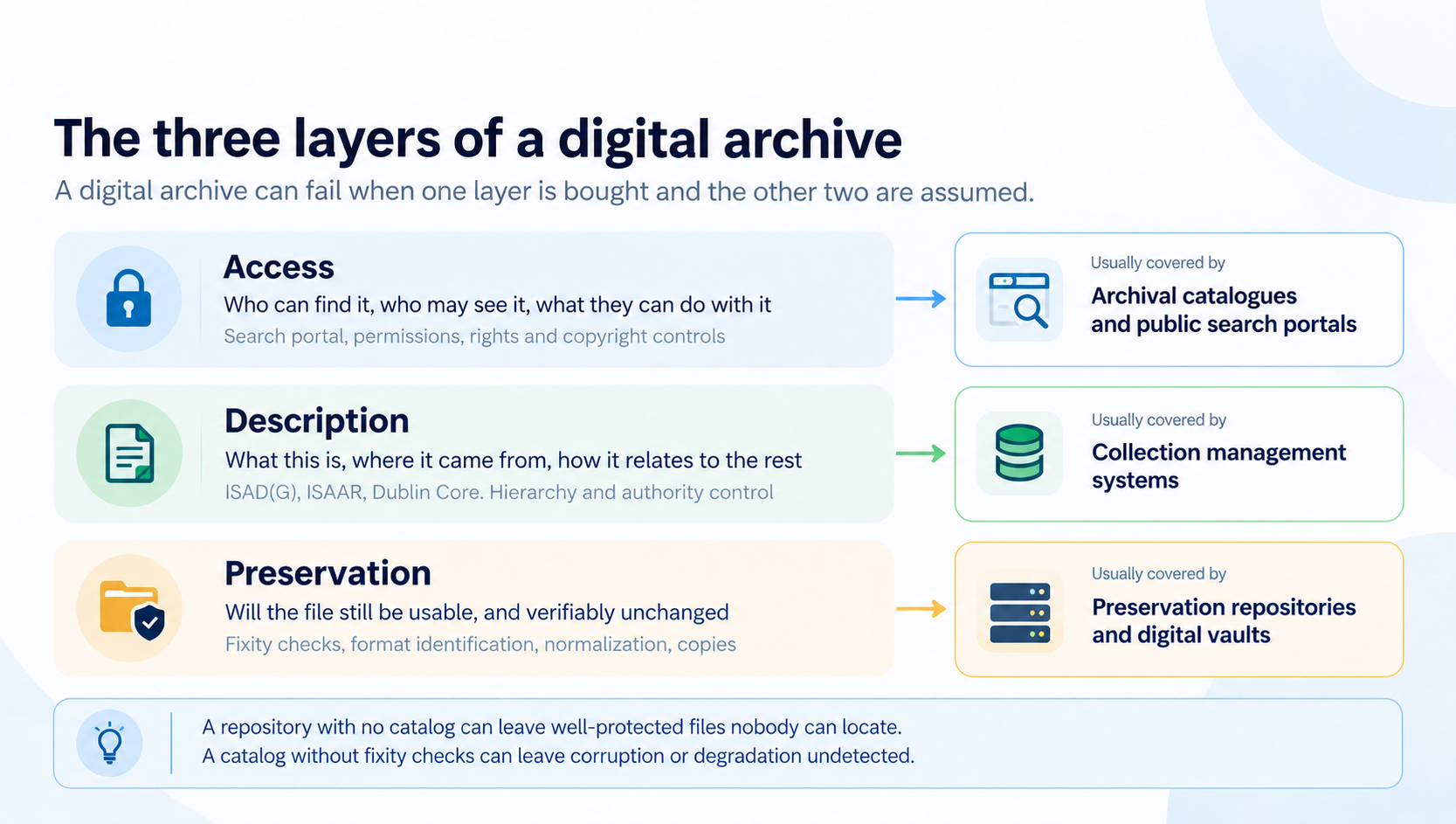
The three layers of a digital archive, and what usually covers each
Digital Preservation keeps digital files openable and verifiable over time, through practices such as fixity checking, where a checksum recorded for each file is re-run periodically to confirm the bits have not changed; format identification; normalization of fragile formats; and managed copies held in more than one place. The reference model is OAIS, published as ISO 14721:2025, whose third edition replaced the 2012 version in March 2025, and the National Digital Stewardship Alliance’s Levels of Digital Preservation set out a practical maturity framework alongside it. Here is a link to a digital preservation checklist aligned with NDSA’s model to see where you stand, along with a digital preservation scorecard to track your progression moving along the levels. If the distinction between keeping a copy and digitally preserving a file is new, the difference between digital storage and preservation covers that difference properly.
Description records what the material is, where it came from and how it relates to everything else. This is where archival standards do their work: ISAD(G) for multi-level description, ISAAR for the people and organizations behind the records, and Dublin Core where simpler interoperable metadata is enough. Two distinctions matter when you compare systems. Descriptive metadata says what something is, while preservation metadata, usually PREMIS, records what has been done to the file, and a system can be strong at one and thin at the other. Separately, a description standard is not an exchange format: ISAD(G) governs how you describe, while EAD governs how that description is handed to somebody else. Metadata management goes further into controlled vocabularies and authority control, if you need more information.
Access is the search poral / OPAC layer anyone outside the archive actually sees. It covers search and browse, a portal for staff or the public or both, configured roles and permissions so that restricted material stays restricted, and controls over what can be downloaded or reused. It is also where rights and copyright decisions become visible, which is a different question from whether somebody is permitted to see a record at all.
One failure mode is buying one layer and assuming the other two came with it. A digital preservation repository with no catalog can leave well-protected files that nobody can locate. A catalog with no fixity checking can leave corruption or degradation undetected. An access portal over an unmanaged shared drive produces both problems at once.
Soutron Global’s archive and digital preservation solution range follows the same division rather than presenting one system as all three. Soutron Archive and CAMS both hold the digital files and cover the description and access layers, with hierarchical description through fonds, series, sub-series, file and item levels, full-text indexing and a configurable web-based search portal. Long-term digital preservation is a separate solution, the MINISIS Trusted Digital Repository, which adheres to the OAIS reference model. How far you need to go with digital preservation is worth settling before a system is chosen. Building a digital preservation strategy provided needed information to help with that decision.
Open source or commercial: what each one actually costs
License cost is only one part of choosing a digital archive solution. The broader difference is who carries responsibility for hosting, upgrades, migration, support and continuity.
Two open-source systems are worth knowing by name before you speak to any supplier. Archivematica is released under the GNU Affero General Public License v3 and led by Artefactual Systems. It implements the ISO-OAIS functional model along with METS, PREMIS, Dublin Core and the Library of Congress BagIt specification, and it produces Archival Information Packages. ArchivesSpace describes itself as an open-source archives information management application, funded through membership, covering accessioning, arrangement, description, preservation and access. For a wider view of what exists, The National Archives in the United Kingdom maintains guidance on digital preservation tools and systems that separates discrete tools such as DROID and PRONOM from full systems, and points to the community registries where the rest are listed.
For some organizations these are the right answers, and an honest look at archival software should say so plainly rather than steering every reader toward a paid product.
What differs between the two routes is who does the work.
|
What you are deciding |
Open source | Commercial |
|---|---|---|
|
License |
No fee |
Subscription or license fee |
| Upgrades | Your team, or a hosting partner you contract and manage separately |
Often supplier-managed under the support or hosting agreement, though deployment models vary |
|
Migration from what you have now |
Yours to plan and run, unless you buy services for it |
Sometimes included in implementation, sometimes scoped and priced separately |
| When the person who set it up leaves |
The working knowledge goes with them unless it was written down |
Supplier support continues, but your own configuration and description conventions can still be lost |
| What you are actually buying | More direct control, and the responsibility that comes with it |
More supplier accountability, and less direct control |
The question underneath that table is not which model is better: Open Source or a Commercial Solution. It is whether your organization has, and will keep having, somebody whose job description includes this system. A collection looked after by one capable person on top of their real role carries a succession risk, and that risk exists whether the software is open source or commercial.
Scale changes which route is realistic, and it changes it through administration rather than through any limit in the software. A single collection looked after by one person is a different proposition from an archive spanning several sites or departments, each with its own permission structure, feeding both a public portal and an internal one, and subject to audit by somebody outside the team. Open-source systems are capable of that work. The question at that size is whether anyone in the organization has the time and the standard knowledge to run it and chase down bug fixes. Where they do not, a supported commercial system is buying upgrade administration, support agreements, and enhanced cybersecurity.
There is a middle route worth naming, because it is often overlooked. Several open-source systems can be bought as a hosted service from a provider who handles installation, upgrades and support. That keeps the open license and the ability to move elsewhere, while shifting the administrative burden to somebody whose job it is. But that path also fragments the complete solution a commercial vendor provides.
Three decisions that outlast the software you choose
Each of these is harder to change once records exist, so settling them before large-scale loading begins reduces rework later. They are not a sequence. Archives work through them in different orders depending on how the material arrived and who is available to do the work.
- What is the unit you are describing? A box, a folder, a digital file, or an individual item. Item-level description gives more precise discovery and costs more processing effort per accession. Higher-level description reduces that workload and can make individual items harder to retrieve. Multi-level description exists so the level can vary within a single collection, but a default still has to be set, and revisiting it means reworking description that has already been done.
- What is captured at the point of ingest, and what gets added later? Fields deferred until later are more likely to stay incomplete. The useful test is to write down what staff can realistically complete during routine processing, make those the required core, and treat lower-priority detail as optional. A short required set that is always filled is worth more than a thorough one that is half empty.
- How will names and dates be recorded? Inconsistent name forms can make an otherwise well-described archive difficult to search reliably. One person entered as Smith, J., J. Smith and Jonathan Smith is three people as far as the system is concerned. Authority control with a built-in thesaurus is the mechanism for managing this. Agreeing on naming rules before large-scale description begins reduces later cleanup, though existing records can also be reconciled retrospectively. Dates need the same treatment, including how approximate dates, spans and descriptive forms such as WWII vs World War II will be handled.
| Seeing these decisions inside a working system If those questions are becoming live rather than hypothetical, the next useful step is to see how a system handles them. Soutron Global’s archive management solutions are built around cataloging, hierarchical description, controlled terms and search portals, with long-term digital preservation available separately through their Trusted Digital Repository. Our team is glad to talk through your material and requirements before you commit to anything. |
What happens to the files you already have
Existing collections can usually carry some technical metadata and folder structure into a new system, but context, provenance and archival description generally need human review. Migrations tend to begin with something already in place: a shared drive built up over fifteen years, a legacy database somebody built in the 1990s, or a disk of scans with filenames along the lines of scan0042.tif.
Some of that can be carried across mechanically. Embedded technical metadata, including EXIF data written by digital cameras and many scanners, usually survives. So do file sizes, formats and, with caveats, dates. Folder structure can often be read as a rough hierarchy, and filenames are worth keeping where somebody followed a convention.
The caveat on dates matters. File systems record creation, modification and last access separately, and which of those survive a copy depends on the filesystem and the method used. Capture the original values before moving anything, then weigh them against dates held inside the documents rather than trusting either source by default.
Much of the remaining context needs human review, or mapping from an existing database, spreadsheet or the contents of a finding aid document. Why something was kept, who created it rather than who last saved it, what it relates to, and whether it is the final version are rarely recoverable from the file alone. Folder names deserve particular attention here, because they often preserve evidence of an existing arrangement, and that structure can be lost when files are moved in bulk. Capture the full folder paths before anything is moved, even if you do not yet know what you will do with them.
This is where capture behavior matters more than a feature list. Soutron Archive supports fast capture of metadata and EXIF data from images, external sources, scanned files and electronic documents, which can reduce the amount of technical metadata staff need to enter by hand. Soutron Global provides expert assistance with data migration as part of implementation, which is the stage where the difference between a tidy source and a messy one becomes a cost rather than a theory.
If you have not scanned anything yet, the decisions in our guide to digitizing archival materials come before this one.
Frequently asked questions
Is there free digital archiving software?
Yes. Archivematica and ArchivesSpace are both open source and free to license. The cost appears elsewhere: hosting, upgrades, configuration, support, and access to someone who understands the archival requirements well enough to configure and maintain the system. The useful question is not whether the license is free, but who owns those responsibilities over time, whether that is your own staff or a hosting provider.
Can we use SharePoint or Google Drive as a digital archive?
SharePoint and Google Drive can store, organize, search and share digital files, and both support metadata of their own. What they are not built to provide by default is an archival description model such as ISAD(G), archival authority control over names, or the preservation-focused fixity workflows expected of a digital repository. They can form part of the wider information environment. Soutron Archive states integration with SharePoint-stored documents, which provides direct access to documents housed in SharePoint.
What is the difference between a digital archive and a digital asset management system?
Purpose, mainly. A digital asset management system manages assets for active use, reuse, distribution and rights management, typically brand and marketing material like videos and photos. A digital archive is concerned with permanent retention, provenance, and the relationship between an item and the rest of the collection. Our guide to digital asset management workflows covers that side in more detail.
Does a digital archive need to be OAIS compliant?
OAIS, published as ISO 14721:2025, is a reference model rather than a certification scheme. It describes the functions and responsibilities a digital archive takes on, including ingest, storage, data management, preservation planning and access. There is no OAIS certificate to hold. When a supplier describes a system as OAIS compliant, they are explaining how their functions map to the model, which is useful information and is not the same as certifying your archive.
How long does it take to get a digital archive system running?
Loading files is only one part of the implementation schedule. The variables that stretch it are how much usable description already exists, how consistent it is, and how many of the decisions above are still open when work starts. An organization arriving with a clean, agreed description has far less preparation to do. One arriving with twenty years of folders and no agreed naming convention does not. Ask any supplier to scope the description work separately from the loading, because that is where the two timelines diverge.
Where to start
The category question comes before the vendor question, and answering them in the wrong order creates avoidable rework. A shortlist of digital archiving software drawn up before you know which of the five categories you are in will contain products that were never going to fit, and the time spent discovering that is the real cost.
A useful first hour costs nothing. Write down, honestly, which of the three layers you already have covered. Does anything check your files for digital corruption? Does anything describe them beyond a filename? Can anyone outside your team find a record without asking you? You may find that only part of one layer is covered, often accessed, through a shared drive that was never intended to be an archive.
That single page is a better basis for a conversation with any supplier than a feature list, because it describes a gap rather than a wish.