Special, corporate, school and public libraries often reach a point where their library software tools no longer match the work. As collections grow and expectations for digital access increase, many library information professionals look to their library automation software to see how they can reduce administrative work and improve access to materials. When looking to upgrade library tools, the natural questions are: What would modern library automation software actually help with and whether the move is worth it.
This guide is for library professionals, administrators, and decision-makers evaluating automation solutions for their libraries, and answers those questions plainly. It explains what a library automation system is, what it does day to day, the types available in 2026, and how to choose one that fits your collection and your team. If you already know you need a cloud-based integrated library system (ILS), the selection checklist further down will be the most useful part of the guide for you.
Whether you manage a special library, corporate collection, legal information centre, research library, school or public library, understanding what modern library automation software can and cannot do is the first step toward choosing the right solution.
Choosing the right library automation software can improve library operation workflows, provide an enhanced user experience, and ensure efficient resource management.
Definition
Library automation software is a system that manages a library’s core operations, including cataloguing, circulation, acquisitions, and search, from a single integrated platform. Usually delivered as a cloud-based integrated library system (ILS), it replaces manual, paper-based, or disconnected tools, allowing staff and users to find, track, and access physical and digital collection materials from one database.
What is library automation software?
In practice, “automation” here means the software takes over the repetitive tasks that libraries once did by hand: creating and maintaining catalogue records, checking items in and out, ordering and tracking materials, and letting people search the collection themselves rather than asking staff to do it for them.
Two related terms come up constantly, and it helps to keep them straight:
- Library automation software is the broad term for the tools that automate library work.
- An integrated library system (ILS) is the type of platform most libraries use to do it. If you want the full background, read our guide to what an integrated library system is.
You will also see the phrase library management software used as a near synonym, particularly in corporate settings. In everyday use, all three describe the same category: one system, sometimes called an automated library system, that runs the library’s core operations, from acquisitions, to serials subscription management, to cataloging books, videos, user experience, and more.

What Does Library Automation Software Do?
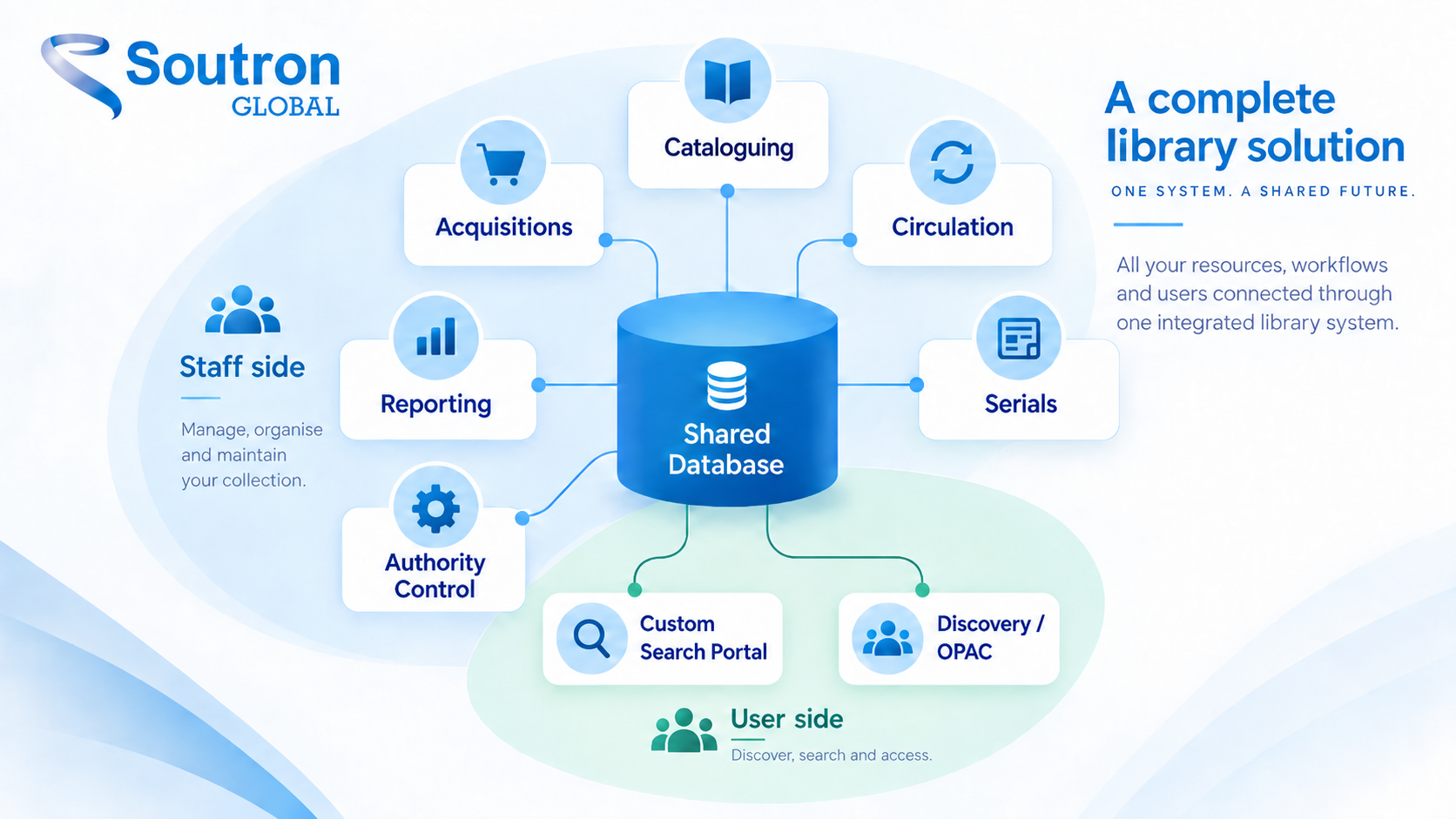
At its core, library automation software centralizes the information and workflows that libraries depend on every day. A modern library automation system covers six core functions:
Cataloguing and Metadata Management
Cataloguing and metadata management allows staff to create, import, edit, and maintain bibliographic records. Modern systems support standards such as MARC21, XML, CSV, in addition to other MARC record formats and library industry standards. The tools often include authority control and copy cataloging tools that help maintain consistent terminology in records used across the catalogue. MARC standards were introduced in the 1960s for metadata. Modern library automation software can also support both flat and hierarchical metadata structures.
The result is a more accurate and searchable collection, with less time spent maintaining records manually. Inconsistent legacy metadata often complicates collection weeding efforts, but data imports during library automation software migrations can improve metadata quality of the bibliographic records during that process.
Circulation Management
Circulation management handles check-outs, check-ins, renewals, reservations, overdue notices, loan tracking, RFID, and self checkout.
Staff can see an item’s status immediately and respond more efficiently to user requests.
Acquisitions and Serials Control
Acquisitions and serials management helps libraries manage ordering, budget tracking and serials subscription management in the same management system as the catalogue, which means purchases become records with less manual data entry.
Plus, these tools provide improved visibility into collection spending and help reduce duplicate purchases.
Discovery and OPAC Access
Discovery and online public access catalogue (OPAC) functionality gives users a self-service portal where they can search collections, place requests, renew loans, and access resources from any device, supporting the discovery experience with interfaces that offer intuitive search capabilities.
The OPAC is what users notice most, because modern systems provide powerful OPAC interfaces that reduce friction for staff and patrons alike as they turn the catalogue from a staff tool into a self-service one.
Managing Physical and Digital Resources
Modern systems support both physical and digital collections within a single environment. Digital items such as photos and videos can be viewed on the users device, while with items like books or magazines, the physical location is given, sometimes off-site from the library for long-term storage. To address long-term storage of born-digital items, library management systems library management systems can work with an optional digital preservation solution, such as a trusted digital repository, to protect born-digital items from format obsolescence.
Libraries can curate and manage books, journals, reports, archives, corporate documents, multimedia assets, and other resources without maintaining separate catalogues. Staff use one environment to manage resources across physical and digital collections instead of checking several disconnected systems to find, update or lend an item.
Reporting and Analytics
Reporting tools provide insight into circulation activity, collection use, popular resources, user engagement, budget allocation, and broader library operations reporting.
Instead of relying on assumptions, library teams use reporting to make informed decisions based on real usage patterns, and they should regularly measure user engagement levels to judge success.
The outcome matters more than the feature list. When these functions live in one system, a request that once touched a spreadsheet, an email thread and a paper form becomes a single record that anyone with the right permissions can see.

Why do libraries automate?
The benefits of library automation are practical rather than dramatic, and they compound over time in how libraries operate day to day:
- Staff time shifts from admin to service. Less manual cataloguing and check-out means library staff have more time helping users, curating the collection and answering research questions.
- Users help themselves. Through the OPAC or search portal, users search, request and renew materials on any device, at any hour, giving them easier access to library resources without waiting for staff.
- One catalogue means fewer errors. Holding physical and digital items in a single system reduces duplicated records, missed renewals and lost items, which helps improve library services.
- Decisions rest on evidence. Circulation and usage reports replace guesswork when it is time to justify a budget or retire part of the collection.
For a one- or two-person team, the first point is usually decisive. The catalogue keeps running even when the person who manages it needs to focus on higher-value activities.
Types of library automation software
Not every library automation system is built for the same library type. Understanding these four distinctions helps libraries make informed decisions when they start comparing systems:
- Cloud/SaaS or on-premise. Library computer systems generally fall into two categories: hosted web services and locally managed or distributed software. Most modern systems are cloud-based: there is no server to run, no software to patch, and updates arrive automatically. On-premise systems still exist where an organisation requires local hosting, but they carry an ongoing IT load. Soutron’s systems are cloud-based SaaS solutions.
- Open source. Open-source library automation software is free to download and modify, but your team typically pays a third party for hosting, configuration and support. Today, the total cost of ownership (TCO) of ‘free’ open-source solutions rivals that of commercial software solutions. Plus, the distributed cyber security inherent in the very nature of open source products has led to many security responsibility issues on open-source platforms.
- Proprietary commercial systems. Commercial systems bundle upgrades, security, support, training and data migration into the subscription. Commercial solutions are bound by their client’s Service Level Agreement that provide reliable service and product upgrades, and often have a similar TCO as open-source products.
- Public-library scale, school, or special/corporate focus. Large public and academic systems are built for high-volume lending across branches, while a local public library may need a more community-centered service model. School libraries have differing teacher and student needs as well. Special and corporate libraries, in law firms, research organisations, government bodies and companies, need a different type of information management: flexible metadata, secure access control and information portals shaped around distinct user groups.
| Type | Best Suited To | What to Expect |
|---|---|---|
| Open-source ILS | Teams with technical resources and tight budgets | No licence fee; Third-party organisation provides technical expertise and support |
| Large public / academic ILS commercial Software | Public libraries, schools, consortia, academic institutions | Broad feature sets supporting high-volume circulation |
| Special / corporate-focused commercial platform | Corporate, legal, government, research and special libraries | Configurable metadata, tailored portals, mixed physical and digital collections |
Automation only helps where the underlying routine is sound. Cataloguing, acquisitions and circulation each carry their own habits and exceptions, and those are what a new system has to absorb. Our white paper on library workflows in the digital world looks at where those routines tend to break and what changes once they sit in one system.
How to choose library automation software: the 7 criteria you need to know

There is no single answer to which is the best library automation software, because the right system depends on your collection, your team’s capacity and your users. Work through these seven criteria before you speak to any vendor, and you will get far more out of every demo.
- Collection types. Does it handle your physical and digital materials, and any special content such as archives, corporate documents or media that your integrated library system may need to scale to?
- Deployment and IT load. Cloud/SaaS or on-premise? Be honest about what your team can maintain. If the answer is “nothing,” cloud is the practical choice.
- Customisation options. Can you tailor fields, record templates, workflows and the look of your search portal? Special collections rarely fit a fixed public library bibliographic template and instead requires a flexible database system where you can easily create new record fields.
- Standards and data. Does it support data standards such as MARC21, XML and CSV, and can it import your existing records cleanly? Data migration often becomes harder when legacy metadata and bibliographic records are inconsistent, so ask to see a sample of your own data migrated.
- Integrations and access. Does it offer single sign-on (SAML, AD, ADFS) and connect to the tools your organisation already uses? Evaluating automation systems for scalability and integration with existing tools is necessary.
- Migration and support. Who is responsible for moving your data? What training, onboarding, and ongoing support are included? Depending on collection size and complexity, implementation often takes several weeks to a few months, depending on collection size and complexity, with ongoing support including an online help portals and phone support. Service & support can be where open source and commercial software differ most when comparing costs and services.
- Scalability. Will the platform continue to meet your needs if your collection, user base, locations, or content types expand?
Write down your questions before demos begin. A clear requirements list helps librarians compare vendors more effectively and keeps the evaluation about your library, not the vendor’s slide deck.
Not sure which features you actually need?
Every collection is different, as are users who access them and the workflows put in-place to keep the collections up-to-date. Talk to our team about how our cloud-based library system could fit your collections, users and workflows.
Request a Demo
How Do Today’s Library Automation Vendors Compare?
There is no single library solution that fits every library.
Open-source platforms appeal to organisations with strong technical resources, but they are only one part of wider library technology choices. Large public-library platforms typically focus on high-volume lending and multi-branch operations. School libraries need a collection system geared towards childhood reading and an easy to search OPAC. Specialised platforms often prioritise configurability, metadata depth, and mixed physical-digital collections, especially where knowledge management needs shape workflows in corporate, legal, and research environments. Specialist platforms such as Soutron’s also offer a discovery layer that lets users search across the library’s own collections and portals from a single search box.
None of these is universally better than the others. A school district consortium and a law firm knowledge centre are solving different problems, and the best library automation software for one would never work for the other.
When comparing library automation systems or a library management system, evaluate them against your own requirements rather than vendor size or market visibility. A vendor whose core market matches your library type will fit your user access needs and staff workflows with far less compromise than a bigger name built for someone else, particularly as technology requirements vary so much by setting.
Choosing your next library automation system well
The best library automation software is not the biggest name or the longest feature list. It is the one that best fits your collection, your team’s capacity, and the way your users actually search.

Define those three things first, write them down, and evaluate every option against them. Libraries that start with requirements rather than demos consistently make better choices, and live with them longer.
See our library automation software working with your own setup in mind
If you manage a special, corporate or research collection and want to see how a modern, cloud-based library system works, we’d be glad to show you. Request a demo and we’ll tailor it to your setup.
Request a Demo
Frequently Asked Questions
What is the difference between library automation software and an integrated library system (ILS)?
Library automation software is the broad category: any tool that automates library work. An integrated library system (ILS) is the type of platform most libraries use to do it, combining cataloguing, circulation, acquisitions and search to manage core library tasks in one system. In everyday use the terms overlap, and most vendors use them interchangeably.
Which software is used for library automation?
Libraries use a range of software depending on their needs. Options include open-source systems, platforms designed for public and academic libraries, and specialised commercial solutions such as Soutron for corporate, legal, research, and special libraries.
Is library automation software cloud-based or installed on-premise?
Both deployment models exist. However, most modern library automation software is now delivered through the cloud as a SaaS solution, reducing infrastructure requirements and simplifying software updates; when comparing hosted vendors, libraries should also review SLAs, security, and availability information.
How much does library automation software cost?
Costs vary based on collection size, user numbers, deployment model, implementation requirements, integrations, support services, and training. Open-source solutions avoid license fees but often require additional technical resources for maintenance and support, while commercial subscriptions may also cover training, support, and software development work that libraries would otherwise need to source separately.
Can library automation software manage both physical and digital collections?
Yes. Modern platforms are designed to manage physical and digital resources within a single catalogue and support day-to-day resource management. This may include books, journals, archives, reports, corporate documents, multimedia assets, and other specialised materials, which helps libraries manage resources consistently across formats.