Every task in a library touches the same underlying records. Ordering a title, cataloguing it, lending it, renewing a journal subscription, answering “do we have this?”: each one depends on knowing what the collection holds, where each item is, and who is using it. An integrated library system exists so that this knowledge lives in one place instead of five.
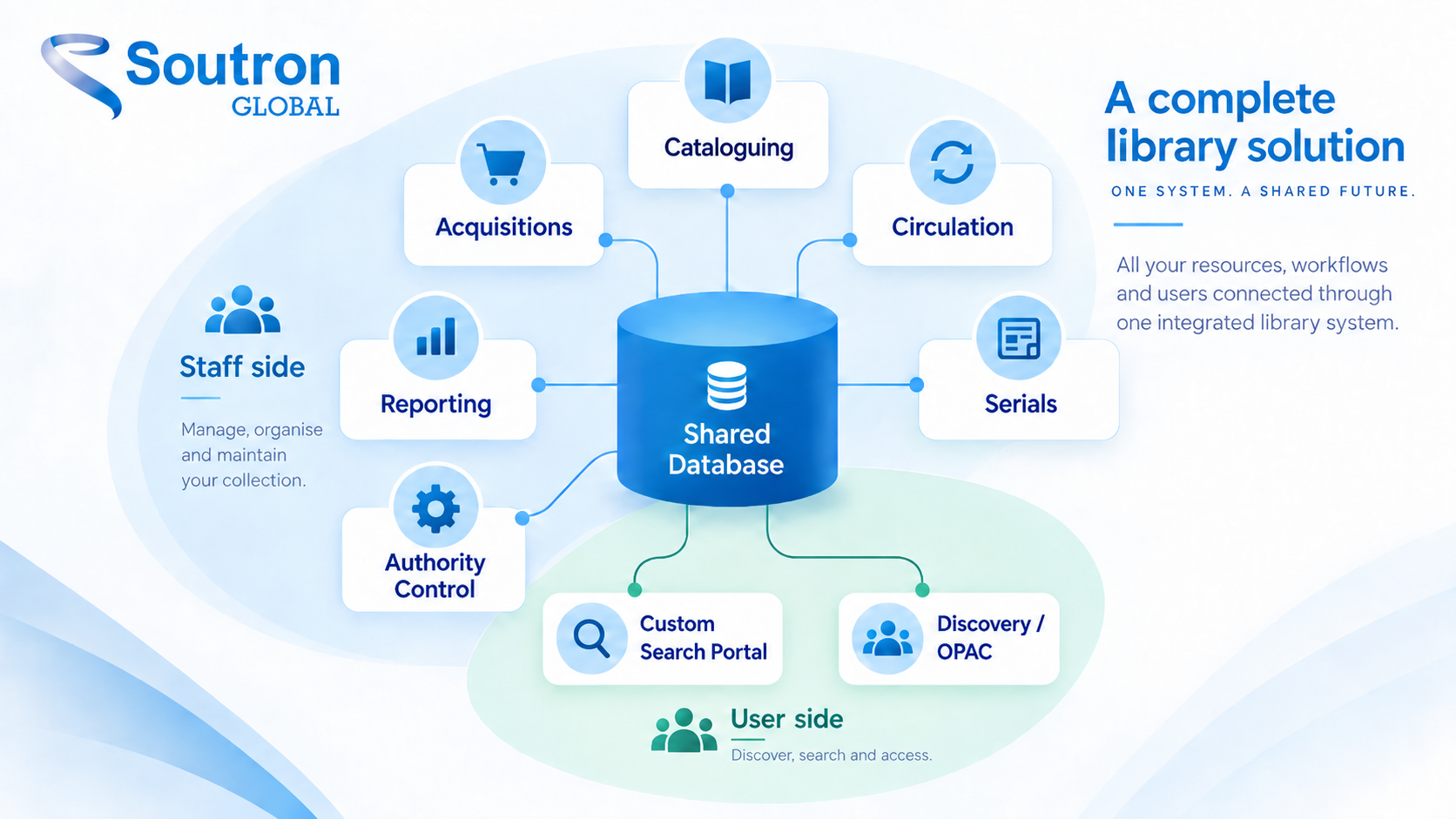
| An integrated library system (ILS) is software that runs a library’s core operations, including cataloguing, acquisitions, circulation, serials, and user search, from one shared database. A record created once becomes available to every function and every user of the system. The same category of software is also called a library management system (LMS). |
This guide explains how an ILS works, who uses one, how it differs from a library services platform, which systems libraries actually run in 2026, and how to evaluate one, whether you manage a public library, an academic collection, or a corporate, legal, or research library.
What is an integrated library system?
An integrated library system is defined by its shared database: every module reads and writes the same records, so information entered once is available everywhere. When a librarian catalogues a new title, that record is immediately visible at the circulation desk, in the public catalogue or search portal, and in every report, with no re-entry and no synchronisation steps required between separate programs.
The system has two faces. Staff work in the back-office modules, ordering, cataloguing, and managing loans and subscriptions. Users meet the system through its search layer, where they find and request materials. You will also hear the same software called a library automation system or a library management system (LMS), which describes the same category from a different angle: the routine work it takes off staff.
The architecture is the same wherever it runs; the configuration is not. A city library uses it to circulate books to thousands of cardholders. A law firm library uses it to manage looseleaf services, research databases, and know-how for a few hundred lawyers. Both are integrated library systems doing their intended job.
What does an ILS actually do?
An ILS typically covers eight working areas, all operating on the same shared records. Together they also automate the repetitive work around those records, such as notices, claims, renewals, and reminders; our guide to library automation software looks at that side of the system in depth.
Cataloguing: Staff create and maintain the records that describe the collection. A public or academic library exchanges bibliographic records for published titles in MARC 21, the format maintained by the Library of Congress, so records move between libraries and suppliers using ‘authoritative, consistent records’. Special libraries need to describe internal intellectual property or industry-specific materials MARC was never designed for, which is why configurable record templates matter for non-public or school libraries.
Acquisitions: Ordering, receiving, and budget tracking. A public or school library manages approval plans and supplier orders; a corporate library manages database licences and subscription renewal dates against a cost centre.
Circulation: Loans, returns, holds, and user records. In a public or school library this means self-service checkouts and hold queues. In a research or legal library it more often means routing a new journal issue to the right team or tracking who is holding a proprietary, in-house document.
Serials management: Journals, standing orders, and other subscriptions: predicting issues, claiming the ones that never arrive, and recording holdings. An academic library is claiming missed print issues; a corporate library is tracking e-journal subscriptions where the renewal date, not the shelf, is the management problem.
The public layer: Public and academic libraries expose the catalogue through an OPAC, the online public access catalogue. Special libraries typically deploy branded custom search portals instead, giving staff and researchers access to internal, proprietary materials in addition to industry subscription databases. Either way, this discovery layer is part of the ILS, not a separate product.
Authority control / Thesaurus: The discipline that keeps names, subjects, and terms consistent, so a search for one form of an author’s name finds everything. Without it, a catalogue fragments quietly over years, and that applies as much to a company’s internal authors, project names, and practice areas as it does to published headings in a public catalogue.
Reporting: Collection use, spending, and activity data that supports budget decisions: what to renew, what to withdraw, what nobody has touched since 2019. A public library reports circulation and programme numbers to its board; an information centre shows which teams actually use the resources it pays for, which is the evidence its renewal negotiations run on.
Integrations: Modern systems connect outward through APIs. A public library or consortium extends its records into resource sharing through interlibrary loan networks; a special library more often needs the system to connect to internal resource systems and the organisational intranet, so the library is not an island inside its parent organisation.
Who uses an ILS?
Integrated library systems run in public, academic, school, and special libraries, and what each type needs from the system differs sharply.
Public libraries and consortia are circulation-heavy: large user populations, holds and renewals, self-service, and often resource sharing across a regional library system or state network.
Academic libraries manage print alongside enormous electronic collections, and many have moved to library services platforms, the successor architecture covered in the next section.
School libraries need lightweight versions of the same functions, usually with copy cataloguing, adjustable holiday scheduling for loan management, and student-friendly search.
Special libraries are the least visible group in most writing about integrated library systems, and the most distinctive. Corporate information centres, law firm libraries, healthcare and research libraries, and government and non-profit collections share a profile: collections where digital subscriptions and internal documents outweigh physical stock, users who are colleagues rather than the public, and a parent organisation with its own security, identity, and information infrastructure the library must fit into. Their systems are judged less on checkout volume and more on findability, configured roles and permissions, custom metadata beyond MARC, and search portals that provide ready access to up-to-date organisation or competitive information. If your library serves an organisation rather than a school or the general public, this is your lane, and most of the guidance written for public libraries will only half apply.
The buying process differs too. Special-library evaluations often involve the parent organisation’s IT and security requirements, particularly around hosting, identity integration, access control, and connections to existing systems. A small information team should also be clear about which responsibilities, such as infrastructure, maintenance, and upgrades, sit with the vendor and which remain in house. Evaluation criteria written for a multi-branch public system only partly transfer.
Soutron’s library management software is one example of these modules running together, bringing cataloguing, acquisitions, circulation and reporting into a single system, with staff access governed by configured roles and permissions.
What is the difference between an ILS, an LMS, and a library services platform?
ILS and library management system are two names for the same category; a library services platform (LSP) is a newer architecture, not a synonym.
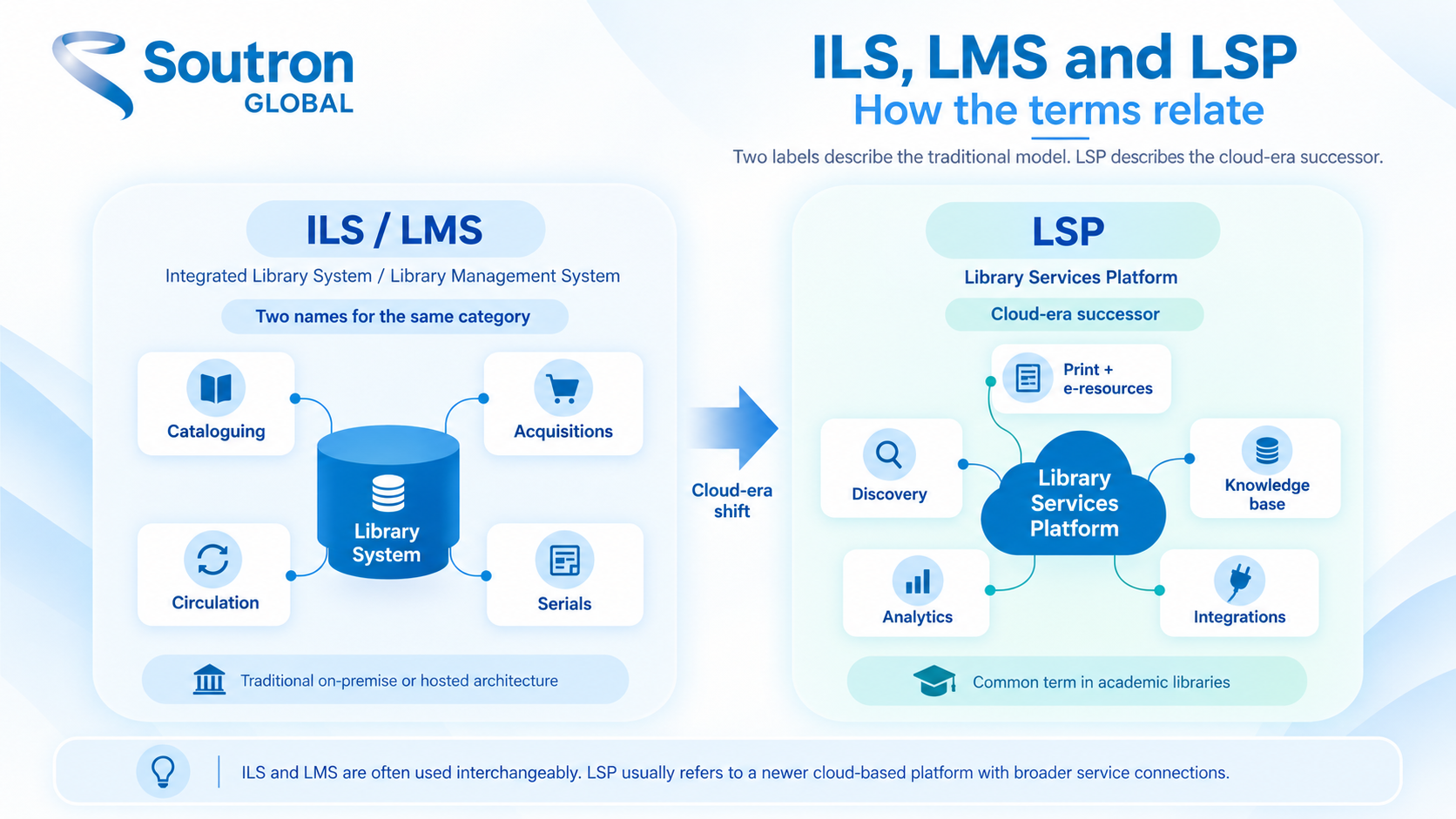
Integrated library system is the standard term in North America, and library management system is more common in UK usage. They describe the same software. (One caution when searching: LMS also means learning management system in education, an unrelated product for delivering courses.)
The library services platform emerged in the 2010s as a cloud-native redesign, built to manage print and electronic resources together in one workflow rather than bolting e-resource management onto a print-era system. LSPs dominate academic libraries: Marshall Breeding’s Library Systems Report 2026 counts 2,835 installations of Clarivate’s Alma, the segment leader, with open-source FOLIO as the main alternative model. Public and special libraries, by contrast, largely continue to run systems in the ILS category: the same report lists SirsiDynix’s Symphony, at 2,077 installations, among the leading public-library systems, and the special-library market is served by ILS products rather than academic platforms.
| Integrated library system (ILS) | Library management system (LMS) | Library services platform (LSP) | |
|---|---|---|---|
| What the name means | The standard name for core library software | The same software, different name |
A cloud-native successor architecture |
|
Who typically uses the term |
North American libraries and vendors | UK and Commonwealth libraries | Academic library market |
| Architecture generation | Established, now largely cloud-hosted | Same as ILS |
Designed cloud-first, print and electronic unified |
|
Typical market |
Public, special, and school libraries | Same as ILS |
Academic and research libraries |
For a buyer, the label matters less than the fit questions later in this guide. No library needs an LSP because the term sounds newer; an academic library managing vast e-resource collections needs a different solution than a law firm library, and the market has segmented around exactly that.
What are examples of integrated library systems?
The honest way to shortlist is by library type, because the market is segmented and systems are built for particular kinds of libraries. The landscape below is drawn from the Library Systems Report 2026 and the vendors’ own product pages. So yes, Polaris is an integrated library system: it is Innovative Interfaces’ ILS, used mainly by public libraries, and the same logic identifies the rest of the field.
|
System |
Vendor | Typical libraries | Model |
|---|---|---|---|
| Alma | Clarivate (Ex Libris) | Academic and research |
Commercial LSP |
|
FOLIO |
Open-source community, supported by EBSCO and others | Academic and research | Open-source LSP |
| WorldShare Management Services | OCLC | Academic |
Commercial LSP |
|
Symphony |
SirsiDynix | Public | Commercial ILS |
| Polaris | Innovative Interfaces | Public |
Commercial ILS |
|
Sierra |
Innovative Interfaces | Public and academic | Commercial ILS |
| Koha | Open-source community, supported by ByWater Solutions and others | Public and academic |
Open-source ILS |
|
Artemis |
Biblionix (Soutron Global) |
School libraries | Commercial ILS |
| Atriuum | Book Systems | Small public and school |
Commercial ILS |
|
Soutron ILS |
Soutron Global | Special: corporate, legal, healthcare, research, engineering, non-profit | Commercial ILS |
| VERSO | Auto-Graphics (Soutron Global) | Public libraries and consortia |
Commercial ILS |
|
Apollo |
Biblionix (Soutron Global) |
Small public and regional libraries |
Commercial ILS |
Two things stand out in this map. Nearly everything written about integrated library systems assumes the public or academic rows, while the special-library segment runs on systems most comparison articles never mention. And the open-source rows are not free in any operational sense; they shift cost from licence fees to hosting, support, and development, a trade examined in our comparison of open-source and commercial library software costs.
The practical use of the map is elimination. Identify your library type first and the realistic shortlist narrows sharply before a single demo is booked, because these systems are designed around different collections, users, and operating models. That is where the questions in the next section start doing their work.
Understanding the modules is one thing. Working out how they map onto the way your team already catalogues, orders and circulates material is where most system reviews get difficult. Our white paper on library workflows in the digital world looks at where those workflows commonly break down and what changes once they sit in a single system.
How do you choose the right ILS?
Seven questions separate a sound ILS decision from an expensive one, and they are worth working through before any vendor conversation.
What do you need, and who decides? Start earlier than your current contract’s expiry date, because a decision made under renewal pressure skips the groundwork. Requirements are rarely one person’s to write: cataloguing, circulation, reference, and IT each notice constraints the others miss. Once you have the list, prioritise it rather than handing a vendor an undifferentiated wish list. Sorting requirements into must have, should have, could have, and will not have this time, an approach often called MoSCoW, turns “it should do everything the old system did” into something a vendor can answer specifically. It is also worth asking a peer institution that migrated recently which stage took them the most time.
Does it fit how your library actually works? A system built for public circulation makes a poor home for a research library’s workflow, and the reverse is equally true. Match the system’s assumptions to your collection, your users, and your daily work, not to a feature count.
What does hosting look like? SaaS means the vendor hosts, maintains, and upgrades the system; on-premise means your organisation does. Ask what the annual fee includes and excludes: hosting, support, upgrades, and backups are bundled in some models and itemised in others, and the difference decides your real cost.
What has to integrate? List what the system must talk to: catalogue data in MARC 21 or CSV, your identity system for sign-on, the intranet where your users already work. An ILS that cannot join your organisation’s infrastructure creates manual work forever.
What does migration involve? Your existing records must be mapped and moved, and the 2026 Library Systems Report notes that implementation is a significant investment with little casual movement between platforms. That is an argument for shortlisting carefully, not for staying on a system that no longer fits.
What support and training come with it? Who answers when something breaks, in which time zones, and what does onboarding for your staff look like? Support quality is where systems that demo identically diverge in year two.
What security concerns need to be addressed? Commercial systems provide security as part of their SLA, whereas there are inherent security issues with all open-sources systems, as covered in this open source vs commercial library systems review.
How will your users search? An OPAC, a branded portal, or a discovery layer over the top. This is the part of the system your users judge it by, so evaluate it with real searches from real users, not the vendor’s demo data.
| If your shortlist includes systems built for corporate, legal, healthcare, or research libraries, see how the Soutron integrated library system handles cataloguing, search portals, and integrations. |
How Soutron approaches the ILS
Soutron ILS is built for special libraries: corporate information centres, law firm and legal libraries, healthcare, research, and non-profit collections. Cataloguing uses configurable record templates, so the system describes research databases, internal reports, and know-how as readily as books. Circulation, acquisitions, serials management, and a thesaurus for authority control run on the same shared database. Users search through a custom search portal rather than a public OPAC, with access governed by configured roles and permissions. The system integrates with SharePoint and Active Directory, provides a RESTful XML API for third-party integrations, supports data exchange in MARC 21, XML, and CSV, and deploys as SaaS or on-premise, with an annual fee covering maintenance, support, and hosting. EUROCONTROL, the European organisation for air navigation safety, used it to unify a multi-site library network into one cohesive catalogue.
For public libraries and consortia, VERSO serves the circulation-and-resource-sharing profile this guide described earlier. For smaller public and regional libraries Apollo is a great ILS system, while Artemis serves the needs of school libraries.
| If you are evaluating systems for a special, school, or public library, request a demo and bring the hardest real-world problems you want the system to solve. |
Frequently asked questions
What does ILS stand for in a library?
Integrated library system: the software that manages a library’s cataloguing, acquisitions, circulation, serials, and search from one shared database. In aviation, ILS means instrument landing system, which is unrelated, and searching the bare acronym often surfaces both senses. In any library context, the acronym always refers to the library management software.
Is an ILS the same as an OPAC?
No, the OPAC, the online public access catalogue, is only the public search layer of the system. The ILS is the whole platform, including the staff modules for cataloguing, acquisitions, circulation, and serials. Special libraries provide staff with a secure internal search portal, with the option to provide clients or the public with access to sections of the collection, but the underlying system is the same.
Can a corporate or law firm library use an integrated library system?
Yes, a special library can run its entire operation on an ILS configured for research workflows: managing digital subscriptions and internal documents, applying custom metadata instead of MARC, controlling access through configured roles and permissions, and providing search portals inside the organisation’s own environment as well as a public or client-facing catalogue.
How much does an ILS cost?
Most systems are priced as an annual subscription or licence that scales with collection size, number of users, and modules. Hosting, support, and maintenance are bundled in some models and itemised in others. The meaningful comparison is total cost of ownership, including implementation, data migration, hosting, and support, rather than the licence line alone.
Final thoughts
The label on the box, whether ILS, LMS, or LSP, matters far less than whether the system’s database, workflows, and search layer match how your library and its users actually work. The market has segmented by library type for good reason, and the fastest route to a sound decision is knowing your segment, your integration requirements, and your migration tolerance before the first vendor call. Whichever segment you sit in, insist on seeing a shortlisted system run your own workflows with your own records, because that is where fit shows. Get those things clear and an integrated library system becomes what it should be: the one place where your collection, your users, and your daily work stay connected.