Introduction to Library Management Software
Library management software (LMS), also known as an Integrated Library System (ILS), provides access to collection materials via a search portal or OPAC. The library software system also automates daily administrative tasks across the library, from a small theological library to a multi-branch public library system, to a multi-national law firm library with offices around the globe.
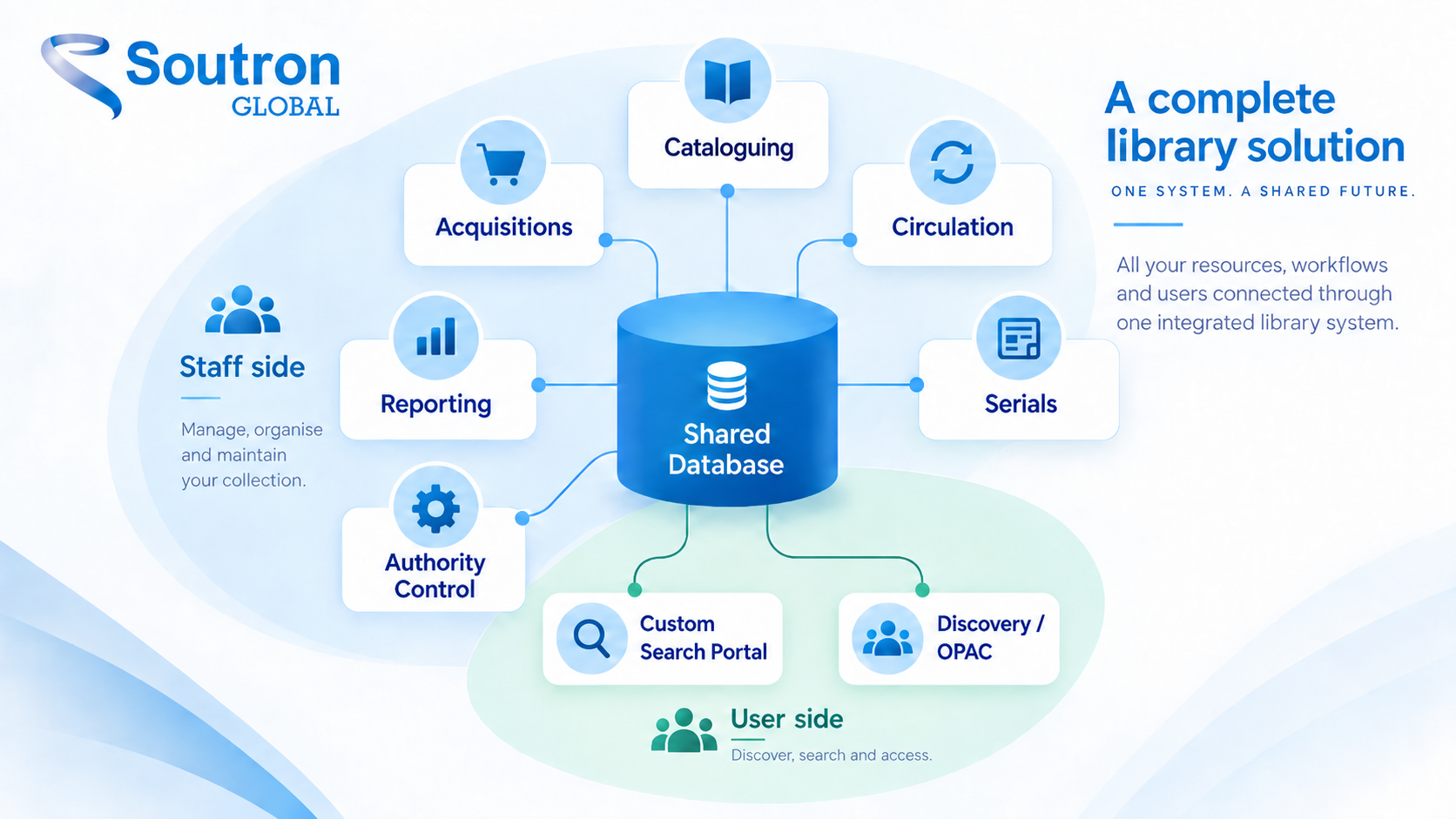
Library management software systems are typically divided into module-based programs covering the search portal or OPAC, cataloging, circulation, patron management, serials or online subscriptions management, and reporting. These modules support both physical and digital library workflows, with online library access for remote users. The software helps library staff manage circulation loans, maintain accurate bibliographic records, deliver a better patron browse or search experience, and create transparent reports.
This guide covers core features, deployment types, real-world examples, selection criteria, and future trends shaping library management.
Whether you’re a public librarian evaluating your first ILS, a corporate information manager modernising a special library’s trusted data, or an IT administrator comparing deployment options, this library software guide covers what you need to know.

Core features of modern library management Software (ILS Modules Explained)
Modern library automation systems unify cataloging, circulation, reporting, and digital access via a search portal or OPAC in a single web based platform. Here are the capabilities that matter most:
Corporate Library Search Portal or Public-facing Discovery OPAC
These modules provide a window into the library collection and other information that libraries provide to their library customers. In a corporate setting, a custom search portal is established that provides users with personalisd information feeds and resources clusters that provide up-to-date information relative to that vertical business. Large organisations often establish multiple search portals that are divided by business group, membership levels, with secure, granular access to the collection. A corporate library could house a single collection database, but have 2 levels of access: one for staff, and another for the public, with each group being granted separate, secure access to materials. A public library, on the other hand, typically provides a self-service Online Public Access Catalog (OPAC) to the public to browse their collections, check-out books, place holds, etc, with no need for a separate information portal.
Cataloging: MARC Records, Metadata & Authority Control
Cataloging modules enable librarians to organise physical and digital materials using standard metadata formats including MARC 21 in public libraries and industry-defined taxonomies in corporate special libraries. This cataloging step is greatly sped up with the use of AI metadata extraction and copy cataloging tools.
Circulation Management: Loans, Fines, Holds & Self-Service
The circulation module tracks when items leave and return to the library. It computes late fees (fines) automatically and sends automated notifications to patrons via email or SMS. Due date alerts notify patrons about item return dates. Self-service portals allow patrons to renew items online, and kiosk integration speeds check-in/check-out.
Acquisition Management: Serial Subscriptions, Books and more
Acquisitions tools manage purchasing of new materials for libraries, while subscription tracking of serial publications manages ongoing subscriptions for journals and newspapers, with the software monitoring recurring magazine and journal deliveries.
Patron Management, User Data Privacy & Personalised Information Delivery
Library management software typically stores user profiles including borrowing histories. Patron management stores user data and assigns different borrowing rules by category. In public libraries, membership tiers set different borrowing limits for users such as children, students, or seniors, with privacy controls for sensitive data. In corporate libraries, special library software like Soutron’s enables libraries to personalise how information is delivered to their customers based on their roles, research needs, and interests.
Reporting & Analytics: Library Usage Statistics and Collection Insights
Reporting and analytics generate insights on circulation statistics, and are often delivered via a dashboard. Usage statistics track the most popular books, turnover rates, or searches that help the library provide the collection items their users are looking for.
Multi-Format Support: Print, Ebooks, Audiobooks & Internal IP Documents
Library management software allows staff to catalog books and track loans across most popular formats, and enables patrons to search and reserve these materials from any device. Supported formats include:
- Print books
- Ebooks
- Audiobooks
- Journals
- DVDs
- Board games
- Corporate library IP documents
Cloud vs. On-Premise vs. Hybrid: Library Management Software Deployment Options
Deployment choices fall into three models—cloud-hosted, on-premise, and hybrid—and each affects costs, maintenance, and scalability differently.
Cloud or web based library management lets library staff access the system through any browser. Vendors handle automatic updates, backups, and security. This model is ideal for a small library or distributed networks.
On-premise setups require local hardware, installation on internal servers, and dedicated IT staff. They suit large corporations with proprietary IP collections or government institutions with strict data policies, though on-premise deployment carries higher setup and maintenance costs.
Hybrid approaches keep the catalog online for patrons while staff modules or archives remain on internal servers. This balances the convenience of an online library with tighter control over sensitive data, supporting remote work and mobile access without sacrificing security verification requirements.

Library Management Software by Library Type: Public, Academic, School & Special Libraries
Needs differ sharply across public, academic, school, and specialist libraries.
Public Libraries
Public libraries prioritise a user friendly user interface (OPAC), self-check kiosk stations, integration with e-lending platforms for ebooks, events management, and family accounts. OPACs are often customised to provide community engagement content about events such as reading programs, community meetings, and more. VERSO, a library management software system used in public libraries across North America, provides all core library management modules, in addition to seamless integration with SHAREit for interlibrary resource sharing loans.
School Libraries
A small school library typically needs simple setup, low cost, icons suitable for grade-school children, and easy training for volunteers and part-time staff. Support for classroom sets, reading programs, and a view of what students are borrowing matters more than advanced metadata.
Academic and Research Libraries
Academic and research libraries demand deep MARC records, authority metadata files, link resolvers, integration with discovery systems, and support for digital repositories.
Specialist Libraries
Specialist libraries such as an engineering or law firm IP collection, company R&D library, or local history collection, need a custom database to hold differing item types, domain-specific metadata, controlled vocabularies for industries with their own defined taxonomies (such as the ones found in this legal library taxonomy list), and proprietrary research materials, brand history, and more. These special libraries have much different needs from a public or academic library, and are best served by using a special library information management solution like Soutron, which can handle any type of industry metadata taxonomy, along with a custom thesaurus to provide authority control of collection materials.
Digital Library Features: OPAC, Remote Access & Ebook Integration
Today’s library users expect a full digital library experience: searching the catalog from home or office, downloading an ebook or e-magazine, placing a hold, and accessing subscription content.
At public libraries, an Online Public Access Catalog allows patrons to look up book availability in real time and searches of library collections from any device, whether a phone, tablet, or desktop.
Special library search portals offer responsive web catalogs with keyword and faceted search, reading lists, and secure access to proprietary IP information. Digital library integration connects ebooks, audiobooks, open access articles, and streaming media, with a link from records to full text. Authentication options include single sign-on for corporations, barcode/PIN for public libraries, and remote access to licensed content. Mobile-friendly interfaces and dedicated apps such as Libby, downloadable from app stores, provide push notifications for due dates, digital membership cards, on-the-go searching and borrowing of ebooks and e-magazines.

Multi-Branch Library Management: Shared Catalogs, Permissions & Scalability
- Multi-branch support: Required for regional systems, universities with campuses across locations, and city networks. A shared catalog with branch-specific holdings, location codes, and interlibrary loan transfer workflows keeps everything connected.
- Permissions and roles: Let branch-level staff manage local circulation while central admins control policy and acquisitions. Volunteer or friends-group access can be granted with limited rights.
- Scalability: Ranges from one tiny community room to a region-wide network. Cloud infrastructure supports horizontal scaling; on-premise demands careful hardware planning. A good example of this can be seen with VERSO and SHAREit, together, they provide the library management and interlibrary loans software services for over 6,000 libraries across North America.
Real-World Example: A city with 5 branches uses one system. Each branch manages local statistics and events while patrons at any location view availability across all branches, request book loans from other branches, and get status updates in real time, with no waiting.
Library Software Usability: Staff Efficiency & Patron Experience
Staff Interface
Staff efficiency and patron satisfaction are directly tied to the user friendly interface. Clunky screens mean longer lines, more errors, and frustrated customers.
For staff: clean circulation screens with minimal clicks for check-in/out, clear alerts for holds, and keyboard shortcuts for power users. Batch operations and workflow screens customised to how each branch works let library staff process check-ins and check-outs without missing a beat.
Patron Experience
For patrons: intuitive search, accessible design following Web Content Accessibility Guidelines (WCAG), language options, and simple online account management. Notifications should be clear, and feedback mechanisms should let users report issues easily. As an example, you can review the Soutron VERSO and SHARE it WCAG notice here, which details how the company develops and maintains it’s software aligned with WCAG 2.0.
Training and Support
Training matters too: built-in help, tooltips, training videos, webinars, and sandbox environments let new staff practice before going live.
How to Choose Library Management Software: Criteria & Checklist
Start by defining needs, shortlisting options, testing via demos, and planning implementation. Key criteria include budget (ongoing subscription vs. one-time install costs), hosted vs. on-premise, feature fit, vendor support, and community reputation.
Check for: MARC records compatibility, industry taxonomy support, such as is required in the legal industry, multi-language support, digital library connectors, API availability, and the ability to import records.
Create a checklist for different stakeholders: librarians, IT staff, finance, and administrators. For a small library, plan 3–6 months from evaluation to go-live. Larger consortia should budget 6–12 months. Corporation implementation schedules vary depending on collection size and number of users. Involve vendors early and share your requirements document with every stakeholder.
One way you can evaluate vendor customer service prior to sign-off is by observing how well that vendor has listened to your needs and how quickly they provided the information/service you were looking for. If the vendor has been responsive, you are in most likely going to continue getting that type of service after sign-off. If you have to go chasing after the vendor to get a response, you should perhaps consider that you will also have to go chasing after them when you need support.
Library Software Implementation: Data Migration, Staff Training & Rollout Planning
Migrating from spreadsheets or legacy systems to modern software is common—and manageable with the right plan. Exporting legacy records, ensuring clean, consistent metadata, import MARC records, and how you want the data to be organised to deliver or present to library customers should all be part of the plan.
Phased rollouts work well: pilot one branch or module first, then organise the full rollout. Schools often use summer breaks. A “big bang” switch fits if staff training and infrastructure are fully ready, otherwise a “waterfall” project management implementation schedule would work best, setting up one module after another.
Staff training should cover circulation workflows, cataloging standards, and basic troubleshooting. Change management means involving staff early, collecting feedback after launch, and adjusting workflows based on real-world use. Rough timeframe for a small library: data migration in about a month, training over 2–3 weeks, testing and launch in another few weeks.
Future of Library Management Software: AI, Automation & Digital Transformation
In the coming years, technology will reshape library management significantly. AI-assisted cataloging is already here. Tools like Soutron’s Metadata Extractor suggest subject metadata classification terms and article abstracts based on content while ‘keeping a human in the loop’ having librarians maintaining final review and approval prior to library catalog ingestion. According to the Ithaka S+R US Library Survey 2025, 40% of library leaders already use AI in discovery and access.
Deeper AI analytics will use borrowing data to optimise collection development across multiple branches. Web based systems will dominate, blending physical and digital library services more fluidly. Community-focused features such as event notification via the OPAC, maker-space availability, and the tracking of nontraditional items like board games or tools, will become standard.
Libraries that invest in the right library management software today position themselves as essential community hubs for the decade ahead.
Define your needs, test demos with real data, and involve your entire team. The right library management software won’t just organise your collection—it will transform how your organisation, community and users connect with knowledge.
Frequently Asked Questions: Library Management Software
What is library management software?
Library management software (LMS), also known as an Integrated Library System (ILS), is a web-based platform that automates daily library operations — including cataloging, circulation, patron management, and reporting — while providing library users with a search portal or OPAC to discover and access collection materials.
What is the difference between an LMS and an ILS?
The terms are often used interchangeably. “Integrated Library System” (ILS) is the traditional term used in the library profession, while “library management software” or “library management system” (LMS) is a broader term increasingly used in modern contexts, particularly for corporate and special libraries that manage more than just traditional library collections.
What are the core modules of a library management system?
Most systems include a search portal or OPAC, cataloging, circulation, patron management, and reporting. Specialist platforms like Soutron also include tools for digital preservation, custom metadata taxonomies, and personalised information delivery.
What is the difference between a public library OPAC and a corporate library search portal?
A public library OPAC is a self-service catalog that allows community members to browse holdings, check out books, and place holds. A corporate library search portal is a customised interface that delivers curated, role-based feeds and resource clusters to employees, often with granular access controls tied to business groups or departments.
What types of libraries use library management software?
Library management software is used across all library types, including public libraries, school libraries, academic and research libraries, and specialist libraries such as law firm libraries, corporate R&D libraries, government archives, and museums. Each library type has different feature requirements, and some — particularly special libraries — are best served by purpose-built solutions like Soutron rather than general-purpose systems.
What is the best deployment option: cloud, on-premise, or hybrid?
It depends on your organisation’s needs. Cloud-based systems are ideal for small libraries or distributed networks, as vendors handle updates, backups, and security. On-premise suits large corporations or government institutions with proprietary collections and strict data policies. Hybrid deployments offer a middle ground, keeping the patron-facing catalog online while retaining sensitive staff modules or archives on internal secure servers.
How does library management software support digital collections?
Modern systems integrate ebooks, audiobooks, open access articles, and streaming media directly into the catalog, linking records to full text. Authentication options include single sign-on for corporate environments, barcode/PIN for public libraries, and remote access to licensed content for distributed users.
Can library management software handle multiple branches?
Yes. Multi-branch systems provide a shared catalog with branch-specific holdings, location codes, and interlibrary loan workflows. Administrators can set permissions so branch staff manage local circulation while central admins control system-wide policy and acquisitions. Platforms like VERSO and SHAREit collectively support over 6,000 libraries across North America.
How is AI being used in library management software?
AI is already in active use for cataloging automation. AI tools like Soutron’s Metadata Extractor suggest subject classification terms and article abstracts based on document content, while keeping librarians in the review loop before records are ingested into the catalog. According to the Ithaka S+R US Library Survey 2025, 40% of library leaders already use AI in discovery and access.
How long does it take to implement library management software?
For a small library, expect roughly one month for data migration, two to three weeks for staff training, and a few additional weeks for testing and launch. Larger consortia should plan for six to twelve months. Corporate implementations vary based on collection size and number of users. A phased rollout piloting one branch or module before full deployment will reduce risk and give staff time to adapt.
What should I look for when choosing library management software?
Key criteria include MARC records compatibility, customisable search portal or OPAC, digital library connectors, API availability, and data import capabilities. Beyond features, evaluate the vendor’s responsiveness during the sales process, it’s a reliable indicator of the support experience you can expect after your go-live date.