Choosing the Right Information Management Solution: From File Sharing and Database Storage to Digital Preservation
Information management is essential for organizations handling digital assets. In today’s digital landscape, organizations rely on a variety of solutions to manage, store, and preserve their day-to-day digital assets. This article explores the full scope of information management solutions—including file sharing platforms, special library databases, collection management systems, document and digital asset management systems, and dedicated digital preservation tools.
Scope: We cover a range of solutions for digital asset management, from everyday file sharing and collaboration tools to specialized systems for long-term preservation and compliance.
Target Audience: This guide is designed for information managers, archivists, IT professionals, records managers, and anyone responsible for the stewardship of organizational knowledge and digital assets.
Why Information Management Matters: Effective information management underpins operational efficiency, regulatory compliance, and risk reduction. By centralizing information, organizations can reduce duplication, improve data accuracy, and ensure that valuable knowledge is preserved for future use. Poor information management can lead to lost productivity, compliance failures, and increased risk of data loss.
Next, we’ll explore the importance of having a comprehensive information management and digital preservation strategy.
Key Definitions: Information Management, Data Management, and Knowledge Management
To clarify the terminology used throughout this article, here are concise definitions of the core concepts:
- Information Management (IM): The broader practice of organizing and controlling information across its lifecycle for reliable access. Effective IM depends on centralized storage and clear governance, ensuring information is accessible, accurate, and secure.
- Data Management: A subset of information management focused specifically on handling raw data—its collection, storage, processing, and quality control.
- Knowledge Management: While related, knowledge management is less about information storage and more about capturing, sharing, and leveraging organizational expertise. It emphasizes collaboration and supports decision-making with up-to-date information and analysis.
- Knowledge Services: Knowledge services integrates information management and strategic learning. The primary goal of knowledge services is to foster a culture of continuous learning and knowledge sharing, ensuring stakeholders have the intellectual capital required to drive innovation and make informed decisions.
Understanding these distinctions is crucial for selecting the right solutions for your organization’s needs.
Do You Have an Information Management and Digital Preservation Strategy?
A well-defined information management and digital preservation strategy is vital for organizations seeking to maximize the value of their digital assets. This article succinctly explains the differences, benefits, and drawbacks between storing digital content in a file-sharing system like SharePoint or Google Drive, a special library database solution like Soutron, a collection management system like MINISIS CAMS, a content or document management/digital asset management system, and using a preservation solution like the MINISIS Trusted Digital Repository to preserve digital content.
In practice, information management is the broader practice of organizing and controlling information across the information lifecycle for reliable access, with data management as a subset focused on handling raw data, and effective IM depending on centralized storage and clear governance. Compared with knowledge management, it is less about collaboration alone and more about supporting decision making with accurate, up-to-date information and analysis.
With this foundation, let’s examine the various solution options available for digital storage and preservation.
Information and Data Management Solution Options for Digital Storage and Preservation
This overview examines how organizations manage content across its full lifecycle—from creation and storage to access, long-term preservation, and eventual disposal. We’ll highlight where information management focuses in practice and how each solution fits into the broader strategy.
Good information handling across business processes reduces duplication, lowers costs associated with data storage, and improves data accuracy by centralizing content to avoid silos.
Let’s review each solution type in detail.
File Sharing as an Information Management System (e.g., SharePoint, Google Drive)
What it is
- Primarily designed for storing, collaborating on, and sharing files among users within an organization, often through cloud platforms.
Benefits for Storing
- Easy to use with a familiar interface for most users.
- Supports real-time collaboration.
- Provides basic version history.
Drawbacks for Storing
- Designed mainly for active collaboration, not archival storage.
- Limited metadata and taxonomy capabilities.
- Often lacks robust search features for large archives.
- Poor retrieval can slow access; employees may lose 3.2 hours weekly searching for information—equal to 8,320 hours annually in a 50-employee organization.
- Basic retention policies, risk of data sprawl, and loss of context over time.
- No provision for peer document reviews or referencing storage location of associated physical items.
Drawbacks for Preservation
- Minimal preservation functionality.
- Lacks tools for format migration, integrity checking, or long-term access strategies.
Transition: Now, let’s look at solutions designed for more structured knowledge and record management.
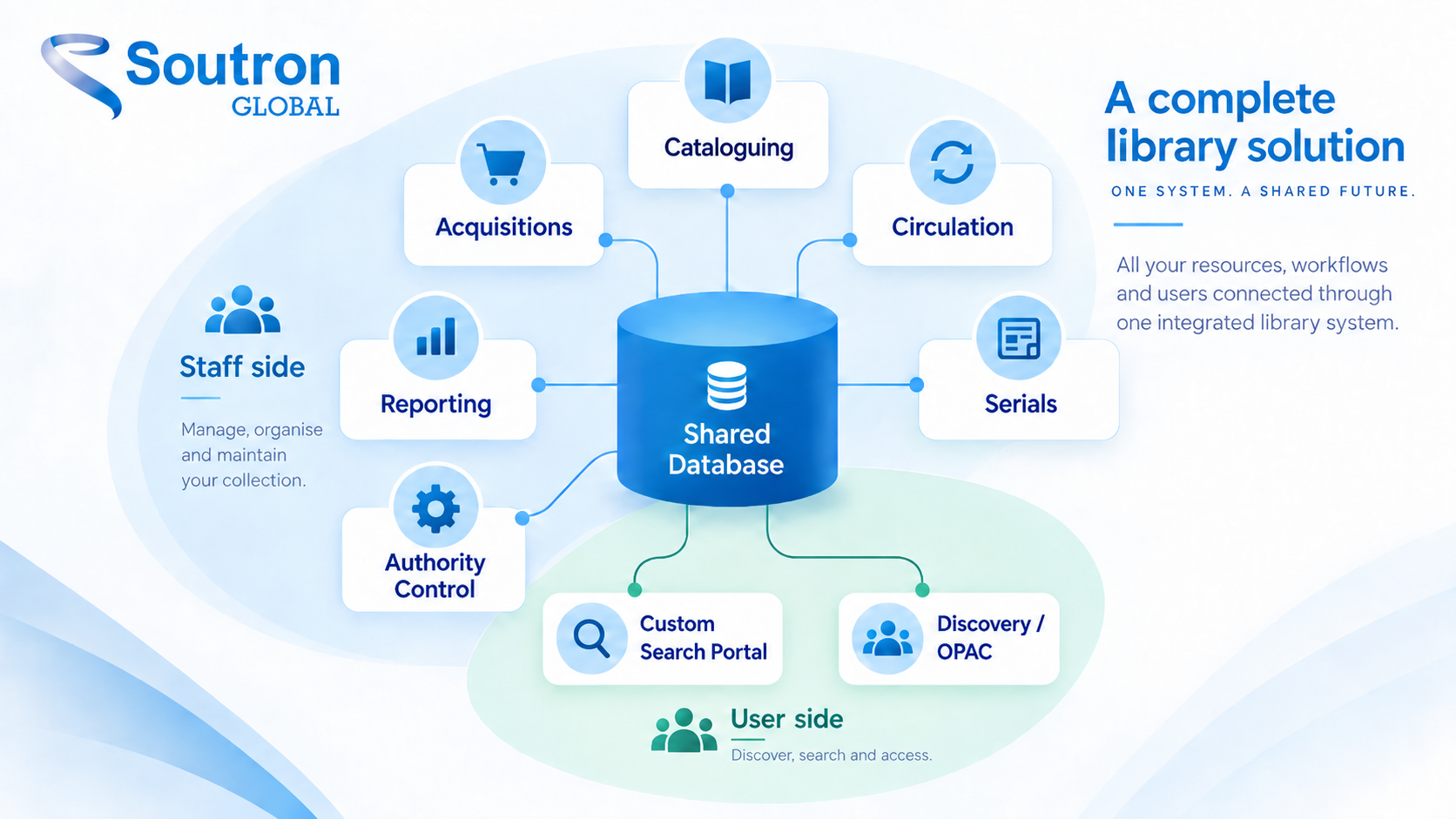
Archive or Special Library Database for Knowledge Services (e.g., Soutron Information Management)
What it is
- Designed for organized access and management of curated knowledge, documents, company records, and specialized proprietary collections.
- Typically implemented as a customized solution for managing workflows associated with organizing and storing a variety of materials, including digital items and rich media.
- Emphasizes cataloging, metadata, and controlled access.
- Optional workflows for knowledge services, including Peer Document Review functionality.
Benefits for Storing
- Strong metadata capabilities with custom taxonomies and controlled vocabularies.
- Good search and discovery features.
- Easy management of different rich media types, including physical items.
- Supports controlled access, usage tracking, and workflows customized for the organization.
- Files and materials stored according to library and archival standards.
- Well-structured implementations can increase productivity by 20%.
Drawbacks for Storing
- May not be optimized for very large, unstructured digital assets (metadata needs to be created).
- Focus is on access and discovery, not bit-level preservation.
- Preservation features are add-ons, such as MINISIS TDR.
Drawbacks for Preservation
- More secure than file sharing, but dedicated preservation functionalities like format migration, detailed provenance tracking, and long-term integrity checks are limited.
Transition: For organizations managing cultural collections, a collection management system may be more appropriate.
Collection Information Management Systems (CMS, MINISIS CAMS)
What it is
- Comprehensive systems designed for managing cultural collections in art collections, museums, archives, and libraries.
- Ensures collections, objects, and other materials can be acquired, registered, and accessioned according to professional standards.
Benefits for Storing
- Streamlines collection management with improved cataloging workflows.
- Supports multi-part and multi-descriptive-focused items or objects, maintaining common accession information.
- Catalogs items with appropriate metadata according to descriptive focus.
Drawbacks for Storing
- Not optimized for very large, unstructured digital assets.
- Focus is on access and discovery, not bit-level preservation.
- Preservation features are add-ons, such as integration with the MINISIS Trusted Digital Repository (TDR).
Drawbacks for Preservation
- More secure than file sharing, but dedicated preservation functionalities like format migration, detailed provenance tracking, and long-term integrity checks are limited.
Transition: Next, we’ll consider document management systems, which are often used for business workflows and compliance.
Document Management and Information Management Systems (DMS)
What they are
- Focuses on managing the lifecycle of documents, business workflows, and other content within an organization.
- Features include workflow automation, version control, information security, and compliance policies.
Benefits for Storing
- Strong metadata management.
- Efficient search capabilities.
- Access control, retention policies, and audit trails.
- Security measures such as encryption and role-based permissions.
- Supports regular auditing and compliance with data privacy regulations.
Drawbacks for Storing
- Primarily geared towards active business content.
- May not be ideal for diverse digital asset types or long-term archival needs.
- Complex to configure.
- Preservation features are usually not a core focus.
Drawbacks for Preservation
- Typically lacks specific preservation tools for format migration, emulation, or detailed digital preservation planning.
Transition: For organizations with a focus on rich media, digital asset management systems offer specialized capabilities.
Digital Asset Management System (DAM)
What it is
- Designed specifically for managing rich media assets (images, videos, audio, etc.).
- Emphasizes organization, searchability, distribution, and rights management.
Benefits for Storing
- Excellent metadata handling for rich media.
- Strong visual search and preview capabilities.
- Efficient distribution workflows.
- Often includes versioning and rights management.
- Organized media assets help teams analyze customer behavior and improve responsiveness.
Drawbacks for Storing
- May not be optimized for all types of digital content (e.g., structured data or records).
- Limited archival controls.
- Preservation features can vary significantly between vendors.
Drawbacks for Preservation
- Some DAMs are incorporating preservation features, but it’s not their primary focus.
- Dedicated preservation functionalities might be less mature.
Transition: For organizations with critical long-term preservation needs, dedicated digital preservation solutions are essential.
Digital Preservation and Data Security Solutions (e.g., MINISIS Trusted Digital Repository (TDR))
What it is
- Built specifically for the long-term preservation and access of digital materials.
- Focuses on ensuring the authenticity, integrity, and usability of content over time.
Benefits for Storing
- Designed for long-term retention with features like bit-level integrity checks and format migration planning.
- Adheres to OAIS (Open Archival Information System) reference model.
- Supports metadata standards for preservation (e.g., PREMIS), content integrity, provenance tracking, and disaster recovery.
- AI and machine learning can automate sorting, tagging, and analysis in preservation workflows.
- Protects sensitive customer data, patient data, private information, and trade secrets over time.
Benefits for Digital Preservation
- Comprehensive suite of tools and workflows for active preservation (format migration, fixity checks, and audit trails).
- Ensures content remains accessible and understandable in the future.
Drawbacks for Storing
- May have a steeper learning curve.
- Can be more expensive than general storage solutions.
- Might require specific expertise to manage effectively.
- Prolonged loss of data access can be existential for organizations.
Transition: To help you compare these solutions at a glance, see the summary table below.
Information Management Solutions Summary Table
The following table provides a quick comparison of the main solution types, highlighting their strengths and best use cases:
| Solution Type | Access & Collaboration | Metadata & Search | Compliance | Preservation | Best For |
|---|---|---|---|---|---|
| File Sharing (SharePoint) | ✅✅✅ | ❌ | ❌ | ❌ | Daily team use |
| Special Library (Soutron) | ✅✅ | ✅✅✅ | ✅ | ❌ | Knowledge centers |
| CMS (MINISIS CAMS) | ✅✅ | ✅✅✅ | ✅ | ❌ | Cross-cultural museums, archives, libraries |
| DMS | ✅✅ | ✅✅ | ✅✅✅ | ❌/⚠️ | Document-heavy workflows |
| DAM | ✅✅✅ | ✅✅ | ⚠️ | ❌ | Marketing/media assets |
| Preservation (MINISIS TDR) | ⚠️ | ✅ | ✅✅✅ | ✅✅✅ | Archives, digital preservation |
Note: This table is designed to help you quickly compare the core features and best-fit scenarios for each information management solution type.
When aligned with core business operations, effective information management systems can streamline operations and improve employee productivity by 20%. For true digital preservation, a dedicated preservation system is generally required.
Each solution has its strengths and is suited to different needs. For active collaboration and document management, SharePoint and DAM systems are ideal. For comprehensive library and archive management, Soutron is a strong choice. For cross-cultural institutions, a CMS like MINISIS CAMS is most appropriate. Across these options, digitizing records and maintaining strong record keeping improve retrieval speed, accessibility, and security, and companies with structured IM systems often see a 20% productivity increase. Used well, these capabilities can give organizations a clear competitive edge. For long-term preservation, solutions like the MINISIS TDR are essential.
If you have any more questions, need further details, or would like to talk with one of our information management team members, feel free to reach out!
Make an appointment with one of our sales consultants to see how our SaaS solutions can maximize the potential of your archive, library, information center, knowledge hub, or museum.
Related Links
Business Rules and How They Affect Database Design
How to Choose an Information Management Solution