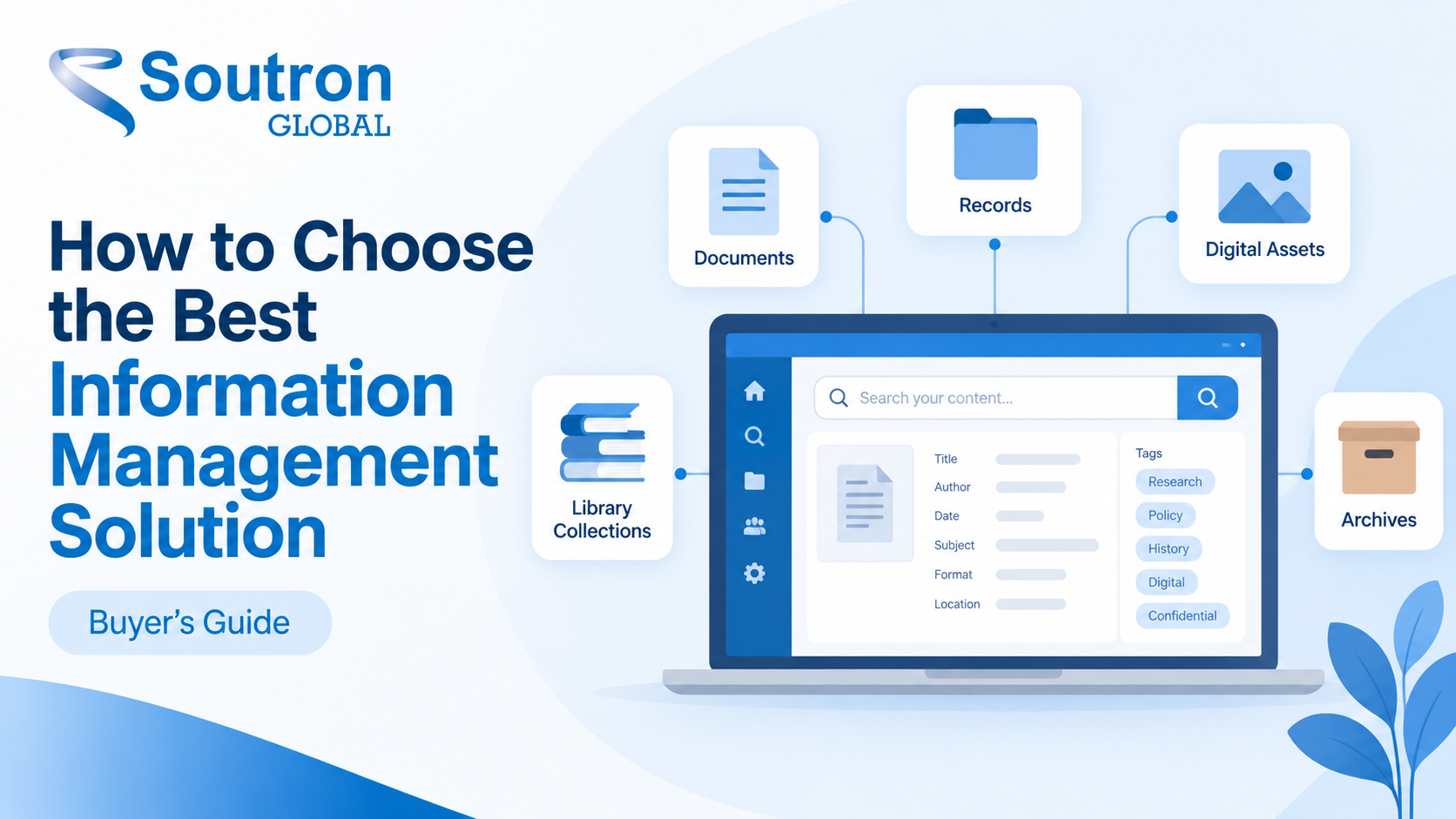
Most of the difficulty in choosing an information management solution happens before anyone looks at a vendor. The category covers at least six kinds of software that solve genuinely different problems. Work out which one your problem belongs to and the shortlist writes itself.
An information management solution is software that catalogues, stores, describes, and controls access to the material an organisation holds, including physical items, digital files, and records. What separates it from general file storage is structured description: defined fields, record templates, and controlled vocabulary that keep material findable as collections grow.
One clarification, because search results for this term mix two unrelated things. A management information system, or MIS, reports on operational data to support business decisions. That is a separate discipline with separate software, and it is not what this guide covers.
This guide is for organisations managing catalogued collections, archives, and retained records: corporate libraries, research and knowledge centres, law firm libraries, business archives, and cultural heritage collections. If you are evaluating enterprise document platforms at corporate scale, the comparison below still applies but expect a different vendor set. It is written from a vendor’s perspective: Soutron builds an information management system for the first group.
What is an information management solution?
The defining feature is structured description, not storage. Four responsibilities follow from it: describing items to a consistent standard, holding physical location records and digital material in one database, defining who can see what, and making the whole collection searchable by people who did not create it.
That distinction is easier to see against the alternative. A shared drive, a document library, or a search tool pointed at a file store will hold your material perfectly well, and a document platform can be configured with columns, content types, and managed terms. The difference is that in a general-purpose store, a contextual description is an optional layer that has to be designed, enforced, and maintained by whoever owns the site. In a system built for this work, it is part of the data model: authority control, a maintained thesaurus, and record templates that constrain what a cataloguer can enter. That is why findability in a file store tends to depend on governance holding, and why the same item can end up described three different ways by three different people.
It is also worth separating the discipline from the software. Information management as a discipline covers policy, ownership, description standards, and governance. The software is what enforces those decisions consistently, which is why buying it does not settle them. A system configured without them will reproduce whatever mess preceded it.
Which type of information management system do you actually need?
Selections go wrong when they start with a vendor shortlist rather than a category decision. Information management solutions across all six categories below are sold in near-identical language, and the differences that decide whether a system still fits you in year five sit in the data model rather than the feature list.
|
System type |
What it manages best | Choose it when | Where it struggles |
| Catalogued holdings, acquisitions, serials, circulation where it applies | Material is catalogued to a bibliographic standard, whether or not items circulate |
Hierarchical archival description and provenance |
|
| Archive management system | Hierarchical description, provenance, accessions, finding aids | Material is unique, described hierarchically from collection or record group down to series and item, and only makes sense in context |
High-volume circulation and transactional lending |
| Retention, disposition, classification, audit trail | The driver is compliance and defensible disposal rather than discovery | Rich description and public-facing access | |
| Enterprise content management or document management | Documents at organisational scale, workflow, versioning | Volume, process automation, and collaboration matter more than description |
Controlled vocabulary and authority control |
|
Digital asset management |
Images, audio, video, rights, and reuse | The collection is rich media and derivative formats matter | Textual and bibliographic material |
| Combined library, archive, and records platform | Several of the above in one catalogue and one search | The organisation holds mixed material and staff work across all of it |
Single-discipline depth at enterprise scale |
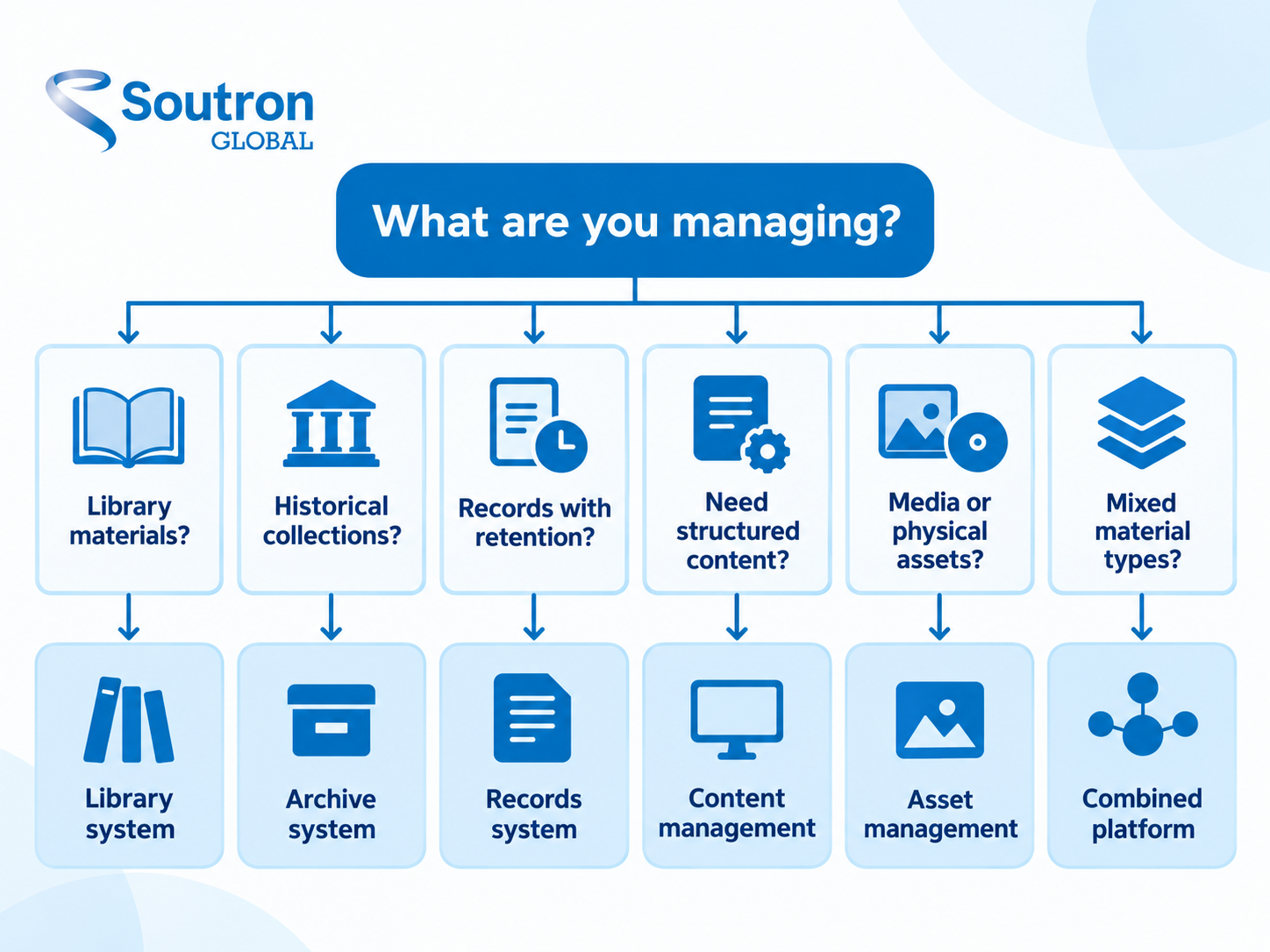
When the honest answer is “more than one”
For a lot of organisations, it is. A corporate library holds a catalogue, a physical archive, a set of retained contracts, and a growing pile of born-digital material that nobody has classified. There are two legitimate routes, and it is worth being straight about the trade-offs of each rather than pretending one always wins.
Separate specialist systems give each team the depth and workflow of its own discipline. The cost is that your search is split across systems, the same subject terms get maintained twice, and every integration between them becomes something you own and maintain. The gap shows up at the reference desk, when answering one question means checking three places.
A combined platform gives you one catalogue, one controlled vocabulary, and a single search across everything. The cost is negotiated internally rather than technically: the disciplines have to agree on shared subject terms and accept that a single system will handle some workflows differently from a dedicated one. Where that agreement is achievable, the payoff is a search that returns everything the organisation holds on a topic, regardless of format.
The practical test is whether your users think in collections or in questions. If researchers arrive asking for the archive specifically, separate systems are defensible. If they arrive with a subject and expect you to know where the answer sits, a split catalogue is working against you. Once you have settled the category, comparing library and archive management systems side by side is a much shorter exercise.
How do you know your current system has reached its limit?
The signals are operational rather than technical. They show up in how staff work around the system, before they show up in anything the system reports. Age alone is not one of them. A system with a sound data model and an engaged supplier is worth more than a newer one without either, and replacing software to solve a policy problem is an expensive way to keep the policy problem.
The signals worth acting on look like this:
- The same item is described two different ways in two places, and nobody can say which record is authoritative.
- Staff maintain a spreadsheet alongside the system to track what the system cannot hold.
- Requests are answered by a person who knows where things are, rather than by a search anyone could run.
- A new material type cannot be catalogued without a workaround that becomes permanent.
- Access requests are handled by emailing an administrator, because the permission model does not match how people actually work.
- The supplier’s release notes have stopped, or upgrades now require a project.
Several of these together are a reason to test where the constraint actually sits: the data model, your own governance, the supplier, or some combination. That distinction matters, because a migration fixes a data model problem and does nothing for a governance problem.
What should you define before you approach any vendor?
Settle these five things before you sit through a demonstration, or the demonstration turns into a feature tour and you lose the ability to compare anything. Organizations run this work in different orders and at different depths, and the sequence matters far less than making sure all five are answered in writing.
- The full scope of material: Everything the system will hold, including the things currently outside any system. The uncatalogued boxes, the departmental drive, the legacy database nobody has opened in three years. Leaving this until after selection turns a migration into a discovery exercise halfway through it.
- Who needs access, and to what: Internal staff, the whole organisation, external researchers, the public. Your access model shapes both cost and configuration effort, so settle it before the feature discussion rather than after.
- The description standards you are already committed to: Three groups matter at selection, and conflating them is how “we support standards” gets accepted as an answer. Content standards such as RDA and ISAD(G) govern what you record and how you word it. Structure standards such as MARC 21, Dublin Core, and EAD define the elements a record is built from; MARC 21 and EAD also carry records between systems, while Dublin Core is an element set that can be expressed in several formats. Value standards such as Library of Congress Subject Headings, the Getty vocabularies, or your own thesaurus govern the terms allowed in those fields. Write down which you use in each group, then ask every vendor what they support in each, and separately how your data is imported, represented, and exported.
- Who is in the room: Cataloguing, reference, records, IT, procurement, and at least one person who will use the search rather than administer it. Requirements written by administrators alone tend to produce systems that are excellent to administer.
- Prioritized requirements, not a wish list: MoSCoW is one method that works well here: sort every requirement into must have, should have, could have, and won’t have this time. That last category is the one people get wrong. It means deferred to a later phase, not rejected, which is what stops it becoming a dumping ground. Done properly, it forces the internal argument to happen before the vendor meeting rather than during procurement, and it gives you a defensible basis for scoring proposals.
Starting the requirements conversation? Our Information Management Basics eBook covers this groundwork in a shorter form, written for managers who have been handed a system decision rather than for specialists. It is a reasonable thing to put in front of the first internal meeting.
What should you evaluate in an information management solution?
Six criteria separate a system that keeps fitting from one that fits only on the day you buy it. Each one is worth a direct question to the vendor rather than a checkbox on a feature grid.
Data model flexibility: Can your team add a field, define a new record template, and create a relationship between two record types without vendor development work? This is one of the strongest indicators of whether the system can keep fitting as your collection changes shape. Ask to see it done in the demonstration, not described.
Metadata and controlled vocabulary: Whether the system supports multiple thesauri, term relationships, authority control, and shared vocabulary across departments. This is the layer that keeps description consistent as staff turn over, and it is easy to underrate at demonstration stage because its value only shows up later. Our guide to metadata management software covers what to look for.
Search and discovery: One search across everything the system holds, control over how results are displayed, and an interface that external users can actually use. Look at what the search and discovery layer does for people who are not librarians, because for many of them the discovery interface is the only part of the system they will ever touch.
Access control: How roles and permissions are configured, whether single sign-on is supported, and who administers access after go-live. Confirm where your data sits, how backups are handled and for how long they are retained, and whether the underlying data model is private to your organisation or shared.
Integration and interoperability: The API, the authentication method, and the import and export formats. Ask specifically what the system exports, in what format, if you leave. Export support in XML, MARC 21, or CSV can be the difference between a future migration and a future rebuild.
Support model and product direction: Who configures the system, how you request a change, and whether the product is still actively developed. A responsive supplier compensates for a great deal; an unresponsive one makes good software feel broken.
Questions to take into a vendor meeting
- Can our team add a new field and a new record template without raising a support ticket?
- Show us how you would model one of our more awkward record types, live.
- Is our data model private to us, or shared with other organisations on the platform?
- How many thesauri can we maintain, and can two departments share subject terms without merging their catalogues?
- Who administers roles and permissions after go-live, us or you?
- What do you export, in what format, and how quickly, if we decide to leave?
- What does integration with our existing systems actually require from our IT team?
- Which parts of this configuration can we change ourselves, and which require you?
How long does it take to migrate to a new information management system?
Our planning guidance is to allow around six months or longer for the whole cycle, from writing requirements to staff working confidently in the new system. That covers requirements gathering, vendor selection, data migration, configuration, and adoption. It is not an implementation estimate, and conflating the two is how projects acquire a reputation for running late when they were simply scoped as something smaller than they were. Ask any vendor to break their timeline into those five stages so you can see which one they are quoting.
Several things outside the software itself can move the timeline further than the software does:
- Data quality in the legacy system: Inconsistent description takes longer to map than a large volume of consistent description.
- How many description standards are in play: One is straightforward. Three, plus local practice that diverged from all of them, is a project in itself.
- Whether the old system exports cleanly: Some do not, and the answer to that question changes your timeline more than any other single factor.
- The volume of material that has never been in any system: This is easy to underestimate at the scoping stage, because nobody owns it.
- The number of user groups whose access has to be rebuilt: Permission modelling is quiet, slow work.
- Whether staff are trained before or after go-live: Training after go-live means the first month is spent building habits you will later have to correct.
A migration is also one of the few points at which restructuring the data has a budget and a deadline attached. Treating it as a straight transfer means paying to move problems into a system you have just bought. Time spent cleaning authority records and reconciling subject terms before the move buys more than the same time spent after it.
How do information management systems handle retention and governance?
Storing records and managing retention are different capabilities, and the difference is whether the rules live in the software or in somebody’s head. A system that manages retention expresses a retention schedule as rules, applies them to records automatically, puts a review step in front of disposal rather than deleting silently, and keeps an audit trail of what happened to a record and when.
This matters to organisations that do not think of themselves as records-driven. A corporate library holding supplier contracts, a research archive holding consent documentation, a law firm library holding matter material: retention obligations arrive whether or not anyone planned for them, and they arrive as a question from legal or audit with a short deadline attached.
For the wider context, ISO 15489-1:2016 sets out the concepts and principles for records management, and ISO 30301:2019 specifies the requirements for a management system for records. ISO 30301 was amended in 2024 and a revision is in progress, so check the current edition before you quote it in a policy document. One distinction matters at evaluation stage: neither is a product certification. ISO 30301 sets requirements that an organisation’s own management system for records can be certified against, not requirements for a vendor’s software, so a supplier claiming conformance should be asked precisely what was assessed and by whom.
The practical question is narrower than the standards suggest: can the system express your retention schedule, and can it show you what it did? If retention is the main driver for your project rather than one requirement among several, it is worth reading what records management is and why it matters before you write the specification.
Where Soutron fits
We build for the first group described at the top of this article: corporate libraries, research and knowledge centres, law firm libraries, archives, and special collections. That focus is the reason the system is shaped the way it is, and it is also why it is not the right answer for every organisation that searches for this term.
The Soutron Information Management System is a repository that holds physical and digital material in a single SQL-based database, with relational structures that allow material to be cross-referenced. Custom fields and record templates are part of the application rather than a development request, which is the flexibility criterion above. Description is supported to AACR2, RDA, ISAD(G), ISAAR(CPF) for authority records, and Dublin Core in one application, with XML, MARC 21, and CSV exchange formats and a full API. On the metadata side, you can create any number of thesauri and controlled vocabularies, each with a full set of term relationships, using a multilingual polyhierarchical thesaurus, and share common taxonomy entries between departments.
It is offered as a fully managed SaaS solution hosted on Soutron servers, or on-premise where organisational or IT policy requires the data to stay on site. Access is through branded search portals that your team can edit and update using the built-in content management tools, and the system integrates with enterprise applications including SharePoint and iManage, with support for single sign-on.
Danone Nutricia Research, for example, replaced a slow hierarchical review process with Soutron’s Document Review system, so that multiple reviewers assess scientific output in parallel rather than in sequence, with automated notifications, personal task dashboards, and a direct connection into the organisation’s existing publication library. That is a long way from a traditional catalogue, and it is the kind of requirement a general document platform tends to handle awkwardly. The Danone Nutricia Research case study sets out what it involved.
Frequently asked questions
What is the difference between an information management system and a management information system?
The two are often confused because the words are nearly identical, and search results for both terms overlap heavily. An information management system holds and retrieves collections, records, documents, and their metadata; what it returns is an item. A management information system processes operational and transactional data; what it returns is a report. A brief asking for management dashboards points toward reporting and analytics tools, of which MIS is one category. A brief asking why nobody can find anything points toward this one.
What is the difference between information management and knowledge management?
Information management deals with recorded material that already exists in a fixed form: documents, records, catalogued items, and their metadata. Knowledge management is broader, because it also covers expertise that has never been written down, along with the practices that capture and share it. Most knowledge management programmes depend on sound information management underneath them.
How much does an information management solution cost?
Specialist systems in this category are quoted rather than listed. Soutron prices its own information management system as a single annual fee covering the software plus hosting, support, and maintenance, with data migration and training charged as a one-time fixed fee and third-party integrations priced separately. Whatever structure a vendor uses, ask all of them for the same four lines so the quotes are comparable: annual fee, one-time migration and configuration, training, and the cost of adding users or collections later.
Can one system manage a library, an archive, and records together?
Yes, provided two conditions hold. The system has to support different description models side by side, since archival hierarchy and bibliographic cataloguing are not the same workflows. The teams involved also have to agree on a shared controlled vocabulary. Where both conditions hold, the benefit is a single search across everything the organisation holds.
What should be in an information management RFP?
At minimum, it should cover five things: the full scope of material including anything currently outside a system; the description standards you are committed to; your access and permission model; your integration requirements and existing systems; and your migration and exit terms, covering both what the vendor imports and what they export if you leave. Order them to suit your procurement process. Everything else in an RFP tends to be detail that follows from these.
Choosing well
A system can have every feature on the list and still disappoint, if it was chosen before anyone wrote down what the organisation holds, who needs to reach it, and how the material has to be described. That work is unglamorous and it is also the whole decision. Get it on paper and the comparison between vendors becomes straightforward, because you will be measuring them against your requirements instead of against each other’s demonstrations.
If you have that written down and want to see how a specialist platform handles the awkward parts of your collection, the Soutron Information Management System is the place to start, and you can book a demonstration whenever your requirements are ready. We would rather work through your requirements document than run a generic product tour.