
The latest update to Soutron software includes many new features and enhancements to help you with your all-important GDPR compliance.
Also included is the eagerly awaited Search Portal integration with Google Analytics. For those who use the Soutron Search Portal to provide public facing access to your library or archive, this integration with Google Analytics will help you better understand your users’ behaviour when they visit and use the search portal.
Get to Know your Library and Archive Users
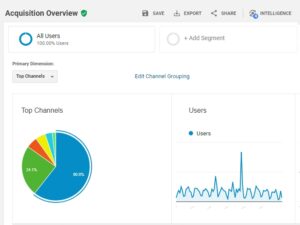
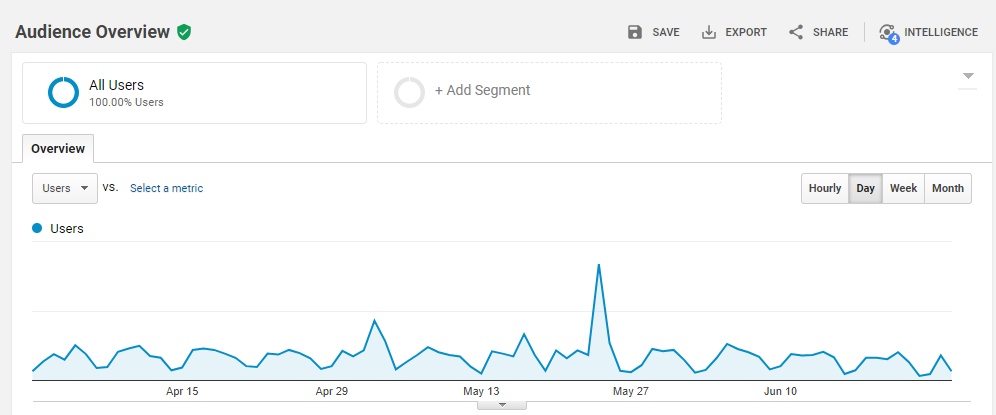
Learning more about your visitors’ behaviour is made a whole lot easier with Google Analytics. Once the integration has been enabled, within 24 hours you will be able to see a myriad of information about your users.
- How many visitors view the search portal, each day, week, year and more
- Which content / records are most viewed
- How long is spent viewing each record
- Where your site visitors are based, geographically
- Do they use mobile, tablets or desktops to access the search portal?
- The number / percentage of new against returning visitors each time
- Even view who is on your search portal now, in real-time!
- And much more…
Digging Deeper
With this new information at your fingertips you will learn more about your library and archive audience. For example, are they predominately an English-speaking audience, based in the UK? Did they visit the portal from your social media activity or from other sources you were not previously aware of?
With Google Analytics enabled you will be able to build up a more detailed understanding of visitors that will allow you to better position the content you make available. Perhaps prompting you to change how you market your online catalogue or run trials with new content to see how it is received.
Google Webmaster Tools Ready!
With the integration to Google Analytics setup and running, you can also take advantage of another key service, Google Webmaster Tools.
This provides a further insight into how your search portal is being read and indexed by Google itself. It will highlight any problems with Google accessing your search portal, provide information on how to setup structured data, more information on search traffic etc.
If you get the opportunity (and time) to look into just how well your library or archive is being read by Google, Google Webmaster Tools is worthy of investigation!
Learn more at:
www.google.co.uk/webmasters
About Google Analytics
For t hose who may not be aware, Google introduced Google Analytics way back in 2005. This free online service allows you to track, monitor and view online reports about your website traffic.
Today it is still one of the most popular website reporting tools available for website owners, administrators and for those who wish to learn about their site visitors and behaviour.
Create a Google Account to Get Started
If you don’t already have a Google account, then it is pretty straightforward to do so. A Google account is needed to access Google Analytics and again is free to setup.
tip: If you are creating an account for your library or archive then we suggest that you setup a new Google account and do not use your own personal Google account. Perhaps ask your IT department to provide you with an email address you can use just for Google, i.e.: google@yourcompany.com
1 – Create a Google account and verify your details:
https://accounts.google.com/SignUp
Now you can use the login details created to access many Google services, including YouTube, Google Webmaster Tools, AdWords and many more.
2 – Navigate to the login page for Google Analytics and login using the account you have created:
www.google.co.uk/analytics
Follow the instructions to create your account and website profile. When asked to enter your website, enter the URL for your Search Portal which we provide, it will be something like:
https://yourorganisation.soutron.net/Portal
3 – You will need to find the Google Analytics Tracking Code. To do this:
i) Select your account from the menu in the ACCOUNT column.
ii) Select a property from the menu in the PROPERTY column.
iii) Under PROPERTY, click Tracking Info > Tracking Code.
You should then see the UA-XXXXXXX number.
4 – This number will need to be entered into the Soutron Administration area under System Configuration:

5 – Once this has been saved, return to Google Analytics as you will need to verify that the tracking code is active.
If you need any further help with configuring and setting up the above, then please visit our Help Desk for support.
Learn more about Soutron Products

Enter your name and email below to get our latest Soutron articles delivered straight to your Inbox.
Note: We always respect your privacy. You may unsubscribe at any time.